
Order Antminer repair parts by the part number printed on the part, not by the model name on the lid. That one habit prevents most of the returns in this category. Bitmain shipped several hashboard revisions, several control board platforms and three different power supply generations under names that look interchangeable and are not, and the machine’s badge tells you almost nothing about which one is inside yours. This is Antminer parts compatibility written the way we check it on our own bench: what marking to read, what it commits you to, and then the arithmetic that decides whether the repair is worth buying at all.
Scope, so you land in the right place. This page is about ordering the part — fitment, tooling and repair economics. If you do not yet know what has failed, start with diagnosing ASIC faults. For preventing the fault in the first place, see the ASIC miner maintenance checklist. For whether the machine is worth owning at your electricity rate, that is the ASIC miner buying guide, and for buying whole used units it is how to buy a used ASIC miner.
The rule that prevents most returns: read the silkscreen
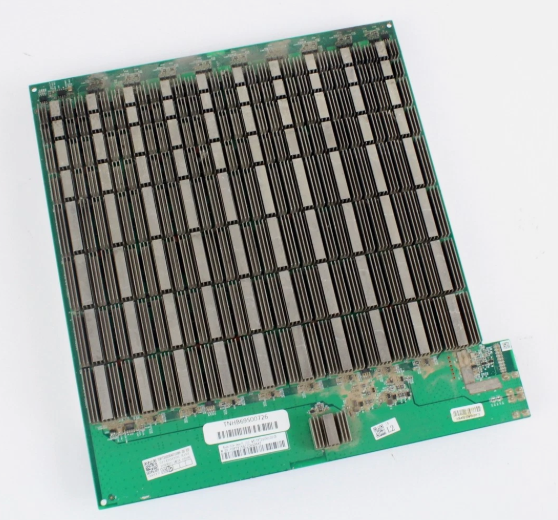
Every board inside an Antminer carries a printed part code. The hashboards carry a BHB number, the control board carries a ctrl_ marking and a serial-style code, the power supply carries a model and a suffix letter. Those markings are the compatibility statement. The model name on the lid is marketing.
This matters more on Antminers than on most hardware because Bitmain revised boards inside a single product name repeatedly, and because the used market relabels machines freely. We have taken back parts ordered from a photograph of the front of a miner. We have never taken back a part ordered from a photograph of the board’s silkscreen.
So the workflow before you spend anything:
- Open the case and photograph the marking on the failed part.
- Photograph the marking on a working one of the same part in the same machine, if there is one. Mismatched revisions inside one miner are common on refurbished units.
- Send both to us before you order. We repair this hardware in-house, so checking a part number against stock takes minutes — ask us and we will confirm the match in writing.
Hashboard compatibility: chip family first, board revision second
Hashboards do not cross chip families, and inside a family they do not always cross board revisions. This is the map for the Antminer generations that still have a live spares channel:
| Machine | Chip | Board code family |
|---|---|---|
| Antminer S19 / S19 Pro | BM1398 | — |
| Antminer S19j Pro | BM1362 | BHB426xx |
| Antminer S19 XP / S19j XP | BM1366 | BHB428xx |
| Antminer S19k Pro | BM1366 | BHB568xx / BHB569xx |
| Antminer S21 / T21 / S21 Hyd | BM1368 | — |
Different chip, different control platform, different voltage-domain layout. An S19j Pro board will not stand in for an S19 XP board because they both say “S19” on the outside. And note the pairing that catches people: the S19 XP and the S19k Pro both run BM1366 silicon but carry different board code families, so “same chip” is not the same thing as “same board”.
Two hashboards we currently stock, and they are opposite purchases. The used S19-series hashboard, tested working is a drop-in for a machine that is down a board — it hashed on a fixture before it was listed. The XP-class 141 TH/s hashboard sold AS-IS is donor stock: untested, no warranty, bought for its BM1366AL chips, connectors and heatsinks. If you want a machine hashing this week, the first one is the purchase. We also list bare S19 Pro hashboards — and that listing says plainly that a bare board is not a miner and has no condition grade attached, because reprinting a whole machine’s spec sheet on a board listing is how buyers end up filing chargebacks.
What a hashboard actually gives you back
Work this out before you order, because it decides everything downstream. A full-size Antminer S19 rated 95 TH/s runs three hashboards of 76 chips each — 228 chips, 3,250 W, 34.2 J/TH for the complete machine. One dead board therefore costs you roughly 31.7 TH/s, or a third of the machine, and that is the number a replacement board buys back. Read your own per-board hashrate and chip count off the miner’s Status page rather than assuming — board counts differ across the range, and our XP-class board listing puts a healthy board of that type at roughly 35 TH/s.
The uncomfortable part is what the machine does while it waits. It keeps running, keeps reporting itself online, and keeps paying its fixed costs — the fans, the control board, the rack space, the hosting fee — out of two-thirds of the revenue. That is the real cost of a dead board, and it is why a board sitting in a drawer is worth more than a board on a shipping schedule.
Power supplies: APW9, APW12 and APW17 are three different generations
The most expensive fitment mistake in this category, because the parts look similar and the names are one digit apart.
- APW9 — the S17 / T17 era. Our Antminer PSU cable for S17 / S19 / T17 is listed as compatible with both APW9 and APW12 units.
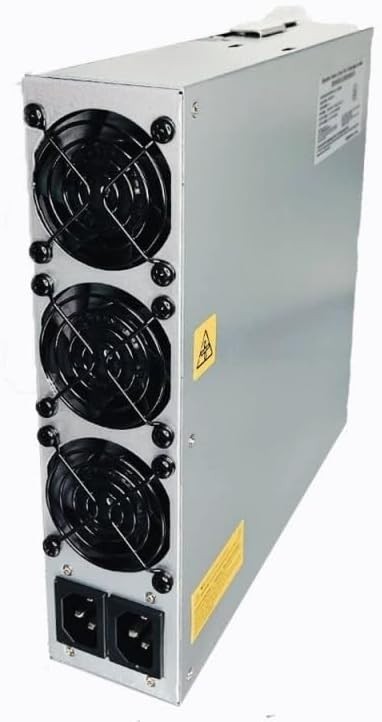
- APW12 — the S19 family. Bitmain’s own APW12 is an air-cooled supply in the 3,600 W class.
- APW17 — the current air-cooled S21 generation (S21, S21+, S21 Pro, S21 XP). The 1215c variant runs 12–15 V DC at 267 A on a 220 V-class input, and it needs a C20-to-P13 4-pin miner cord.
Three things people get wrong here, all of them avoidable:
APW17 is not APW12. Different generation, different output rating, different connector. An S19-series machine wants an APW12; an S21-class machine wants an APW17. Neither substitutes for the other.
The suffix letter is part of the part number. APW17-1215a and APW17-1215c are not the same unit. Read the label on the supply you are replacing, or send us a photo of it and we will match it. We carry APW17-1215c stock — ask us for the current unit and its condition in writing before you order it, because we list that supply in more than one place and we would rather confirm than assume.
There is no 110 V mode on a 220 V-class supply, and no adapter conjures one at this power level. If your problem is that you have 110 V in the building, the answer is a 240 V-to-110 V conversion kit and a derated firmware profile — and be clear that this does not lower the machine’s energy demand. You run it slower and get proportionally less hashrate. The buying guide covers the home-electrical side properly.
The immersion trap: fanless is not faulty
Aftermarket supplies in the APW12 form factor are sold in air-cooled and immersion versions built on the same chassis, and the immersion one has empty fan apertures. That is correct for a submerged tank — the fluid does the cooling — and catastrophic in open air. Our 10 kW immersion APW12-format supply is explicitly the submerged one, and it also carries a fact worth repeating: there is no 10 kW immersion APW12 in Bitmain’s catalogue. Units at that rating are third-party supplies built in the APW12 form factor for the immersion overclocking market. That is a legitimate category; it is not Bitmain silicon, QC or warranty, and any listing implying otherwise is wrong.
If you are air-cooled and want headroom for tuned firmware, the 5,600 W APW12-format overclocking supply is the honest version of that purchase — with the caveat its own page makes: 5,600 W at 240 V is over 23 A continuous, which is a dedicated 30 A circuit, and a bigger supply removes one limit while leaving heat, efficiency and warranty exactly where they were.
Control boards: match the marking, never the model name
A control board is the small computer that holds firmware, talks to the hashboards over ribbon cables, drives the fans and serves the web interface. When it fails, the symptoms imitate everything else: no web UI, no DHCP lease, phantom fan errors, healthy hashboards reporting as absent.
Compatibility here is not derivable from the model name at all. Our tested-working Antminer control board is listed by its physical marking — ctrl_C55 V2.3011 / NGSB202101 — rather than by a compatibility list, and that is deliberate. Guessing control board fitment from a model name is how people end up with a board that boots perfectly and never sees a hashboard. Photograph your markings and send them over.
Two things to establish before you buy a board at all:
- Reseat every ribbon cable first. It is free and it fixes a surprising share of “dead control board” machines. All boards missing at once is far more often a control board, a power rail or a cable than three simultaneous board failures; one board missing with the rest fine is almost never the control board.
- Decide whether it is locked or dead. A board that boots, gets an IP and serves a UI but rejects every firmware image is a recovery job, not a replacement — that is what the Amlogic control board unlock kit is for, across S19, S19 Pro, S19j Pro, S19 SE, S19 XP and T19. A board that will not boot at all is a hardware fault and no kit fixes it. And no unlock kit works on every board and every firmware revision — anyone telling you theirs is universal is selling you something.
On the Canaan side, the counterfeit control board market is real. Clone boards commonly survive a bench test and then fail on thermal cycling, or refuse a manufacturer firmware update. On a 3.4 kW machine, intermittent dropouts cost far more in lost runtime than the price difference — which is the entire reason we list a genuine Avalon 1166 Pro control board and say so in the title. Ask any seller for a photograph of the actual board you are being sent.
Fans: same footprint, different motor
Antminer fans across the S19, S20 and S21 series share the 120 × 120 × 38 mm “12038” footprint, a 4-pin PWM connector and 12 V supply. They are physically interchangeable and they are not electrically equivalent: S19-series machines typically ship a 12 V fan in the region of 2.7 A, while later S21 and T21 builds use a noticeably higher-current fan. Fit an underrated fan to a machine that expects more airflow and you will chase thermal throttling you cannot explain, on a machine that reports no fault at all.
Buy the dual fan assembly with the backplate rather than loose fans — you get the mounting hardware, so the swap is a bolt-in — and tell us the exact model so we can confirm the current rating matches before it ships. Then three fitting rules that cost nothing: replace fans in pairs, check orientation before you close the case (a reversed fan cooks a hashboard quietly), and blow the heatsinks out while you are in there, because a large share of “dead fan” calls turn out to be a dust-blocked heatsink and a fan that gave up.
Before you order a fan at all, put the suspect one on an ASIC fan tester. A miner halting on a fan fault is only telling you it did not see the RPM it expected on that header — which is equally true of a seized fan, a chafed tach wire, or a failed header on the control board. Thirty seconds on a tester tells you which. It is also the right way to check a replacement fan before you fit it.
Chips: read the suffix, and do not buy them without a fixture
Bare ASICs are the deepest end of this category. Our BM1368AA chips for S21 / T21 / S21 Hyd are hashboard rework parts, not something you plug in, and the suffix is part of the fitment: Bitmain ships chip families with letter suffixes that are not always drop-in equivalents across board revisions. Read the marking on the chips already on your board and match it.
Chip-level work is worth doing when you have isolated one or two dead chips in a single voltage domain on an otherwise healthy board. It is usually not worth doing with multiple failed domains, a burnt or delaminated PCB, water damage, or lifted pads — by the time that rework is paid for you are near the cost of a tested board with no guarantee at the end. You also cannot do it blind: guessing which chip is dead on a board carrying more than a hundred of them wastes more in chips than a fixture costs. A BM1366-series chip tester covers the S19 XP and S19k Pro generation — and note it does not cover BM1398 or BM1368 boards, despite the numbers sitting close together.
Buy the diagnosis before you buy the part
Roughly half the “dead hashboard” units that reach our bench have a healthy board and a sick PSU, control board or ribbon cable. That is our own bench experience across the machines we take in, not a published failure statistic — but it is consistent enough that we build the buying advice on it: the cheapest step in any repair is proving what is actually broken.
The order of operations, cheapest first
- Reseat the ribbon cables and check the AC feed under load. Free. Fixes more machines than anyone admits.
- Test the PSU under load, outside the miner. An APW12 PSU tester applies a load and the enable signal on the bench. This matters because a tired APW12 rarely dies cleanly — it sags under load, the miner drops a board or reboots, and every symptom points at the hashboards. People buy a board, fit it, and watch the same fault return.
- Spin the suspect fan on a fan tester. Thirty seconds, as above.
- Chain-test the hashboard on a fixture. This is what turns “the miner is broken” into “chip 41 in domain 5 is dead”.
- Only then reach for chips and hot air.
Read the EEPROM before you sweep the board
This one is worth the price of the right tool on its own. Every hashboard carries a small EEPROM holding its identity and calibration data — frequency and voltage settings, chip counts, serial. The boards in one miner have to carry matching data or the control board will not accept the set. A board whose EEPROM is wiped or corrupted can be electrically perfect and still report as missing or refuse to initialise, and no amount of chip rework fixes it.
The catch is that a meaningful minority of boards — commonly put at around one in ten — come off a fixture sweep with their EEPROM contents cleared. So the habit that saves you is: read and save the EEPROM before you sweep, not after. Which is why the fixtures worth owning have read/write on the same box that does the sweep — the Antminer B8 tester (hashboards, PSUs, fans, LM75A sensors and EEPROM in one handheld unit) or the universal hashboard tester with EEPROM editing, which is also the tool for recovering a board whose data is already gone.
Match the fixture to your bench, not to your ambition
Fixtures are adapter-and-firmware bound, and coverage is the spec that matters — not the price. Pick by what you actually hold:
- K3L with RI probe — S19, S21, T21, KS3, KS5. The RI probe checks voltage domains before you apply full power, which is the step that stops a short becoming a bigger short.
- WhatsMiner M20 / M30 fixture — MicroBT boards, which the Antminer fixtures do not cover.
- IceRiver KS-series fixture — Kaspa hardware.
One caveat that applies to every general-purpose fixture: the supported-model list is a firmware property, not a hardware one. The coverage you get is the coverage your unit’s firmware version shipped with. If you are buying for one specific board family — especially anything newer than the 21 series — tell us the model and we will check the firmware version on the actual unit rather than let you find out at the bench.
If you are moving to component-level work, the full hashboard repair tool kit and the 20-piece kit that includes a fixture cover the bench side. Two honest warnings on both: neither is a substitute for a board-family fixture unless one is explicitly included, and hot air alone will not reliably reflow a BGA ASIC on a multi-layer board with heavy copper planes. The plane sinks heat away faster than the nozzle delivers it, and compensating with more air is how boards get warped and neighbouring components cooked. Budget for a preheater or hot plate big enough to take a full board. The 20-piece kit is also non-returnable with a 40% restocking fee — that is the term on the listing and we would rather put it here than bury it.
When a fixture pays for itself, in one line of arithmetic
Everyone asks whether to buy the tool or just buy parts until something works. There is an actual answer:
Diagnoses to break even ≈ fixture cost ÷ (probability the part is innocent × cost of the part you would have bought).
Put our bench figure in — call it a coin flip that a suspected hashboard is not the fault — and it collapses to roughly twice the ratio of fixture price to board price. If a fixture costs eight times a tested used board, that is about sixteen wrong diagnoses before the fixture has paid for itself. Divide the two numbers off the listings yourself; they change, the arithmetic does not.
What that means in practice is unglamorous and worth saying out loud. If you own one miner, do not buy a hashboard fixture. Buy the cheap end of the diagnostic ladder — the PSU tester and the fan tester, where the ratio is far more favourable — and send the board out or buy a tested replacement. Fixtures start making sense somewhere in the low tens of machines, or immediately if you are buying and reselling repaired stock, because then every diagnosis is a purchase decision and the fixture is priced into your margin rather than your hobby.
What the repair is actually worth at today’s numbers
A restored terahash is only worth having if the machine earns at your power rate. This is the step people skip, and it is the one that turns a sensible repair into money set on fire. Across a fleet the same question has a second half — what the spares shelf costs before anything breaks — and that is priced in used ASIC miner fleet economics.
Inputs, and they change every day. Derived 27 July 2026 from network data, not copied from a dashboard:
| Input | Value | Source |
|---|---|---|
| Difficulty | 126.23 T | mempool.space, 27 Jul 2026 |
| Network hashrate | ~866 EH/s | mempool.space, 27 Jul 2026 |
| BTC | $64,860 | 27 Jul 2026 |
| Fee share of block reward | ~0.69% | Luxor, 13 Jul 2026 |
| Derived hashprice | ~$32.5 / PH/s / day | computed from the above |
From that, break-even electricity rate — the point where a machine earns exactly what it costs to run — is hashprice ÷ (24 × J/TH). The derivation is in the buying guide; here is what it says about the machines you would be putting parts into:
| Machine | Efficiency | Break-even $/kWh |
|---|---|---|
| Antminer S19 95 TH/s | 34.2 J/TH | $0.040 |
| Antminer S19 Pro 110 TH/s | 29.5 J/TH | $0.046 |
| Antminer S19k Pro 120 TH/s | 23.0 J/TH | $0.059 |
| Antminer S19 XP 141 TH/s | 21.5 J/TH | $0.063 |
| Antminer S21 Pro 245 TH/s | 15.0 J/TH | $0.090 |
Read the first row carefully before you order an S19 board. At the US residential average of about 18.4 ¢/kWh, repairing an S19 buys you a faster loss, not a return. A complete S19 at 3,250 W consumes 2,340 kWh a month; at 12 ¢/kWh that is about $281 of electricity to produce roughly $93 of Bitcoin at today’s hashprice. Restoring the third board makes that machine lose money more efficiently. The correct repair spend on a machine you cannot afford to run is zero, and the correct move is to part it out — which is exactly why AS-IS donor boards are a legitimate thing to sell and to buy.
Now the case where the repair does pay. Revenue per terahash is about $0.98 per TH per month at today’s hashprice. Power per terahash per month is J/TH × 0.72 kWh times your rate. So:
- S19 at 34.2 J/TH on 3 ¢ power: $0.98 revenue − $0.74 power ≈ $0.24 per TH per month. Restoring one 31.7 TH/s board earns about $7.50 a month of margin. Divide the board’s price by that and you have your payback in months.
- S19 XP at 21.5 J/TH on 3 ¢ power: $0.98 − $0.46 ≈ $0.51 per TH per month. The same repair on a board of roughly 35 TH/s earns about $18 a month.
Same job, same afternoon, more than double the payback rate on the more efficient machine. That is the whole argument for putting your parts budget into newer silicon and letting the oldest units become donors. And at 5 ¢/kWh the S19 line above goes negative outright — the repair has no positive value at any part price.
On hosting, a dead board costs you more than it does at home
This is the part almost nobody prices in. If you pay a metered rate, a dead hashboard costs you its share of revenue and saves you its share of power, so the loss is roughly proportional. If you pay a flat fee per machine per month, you keep paying the whole fee for two-thirds of the output.
Convert any flat fee to a real rate the same way: fee ÷ (kW × 730). A $225/month flat fee on a 3.25 kW S19 is about 9.5 ¢/kWh equivalent — already more than double that machine’s break-even. Drop a board and your effective cost per delivered terahash rises by half again, because the denominator shrank and the fee did not. Hosted machines are therefore the ones where keeping a spare hashboard, PSU and fan assembly on the shelf genuinely pays: the spare is not competing against the part price, it is competing against weeks of a fee you owe regardless.
When to stop
Our line, and it has not changed: if parts and labour approach half the price of the same model working, stop. A machine with two dead boards is a parts donor, not a project — more useful to you as a source of a good PSU, good fans and a good control board than as a unit you keep fighting. The exception is the fleet case, where one dead unit makes every other identical unit repairable, and that is precisely the point at which fixtures and spares start paying for themselves.
One more thing to check before you commit to any generation: does its chip family still have a spares channel? A board nobody stocks makes the whole machine disposable, whatever its condition. That is a purchase question as much as a repair one — it belongs in the decision when you buy the machine, which is why it sits in how to buy a used ASIC miner too.
Everything referenced here is in repair parts and tools; whole machines are in the full ASIC miner inventory and the used ASIC miners category. If you are unsure whether a part fits, send us the silkscreen markings and we will check it against stock before you spend anything — that is what we are here for.
One line to close the arithmetic out. When a machine falls the wrong side of every threshold above, the last honest move is not the scrap bin and it is not a shelf you will never come back to — sell the carcass instead of shelving it. We buy used hardware in any quantity and in any condition, broken units included, which is where a good deal of the tested stock on this page came from in the first place.
Frequently Asked Questions
How do I know which Antminer hashboard I need?
Read the BHB code silkscreened on the board itself rather than going by the model name on the machine. S19j Pro boards are BHB426xx running BM1362 chips, S19 XP and S19j XP boards are BHB428xx running BM1366, and S19k Pro boards are BHB568xx or BHB569xx. The S19 and S19 Pro use BM1398 and the S21, T21 and S21 Hyd use BM1368. Boards do not cross chip families, and inside a family the board revision still has to match, so photograph the code and confirm it with the seller before ordering.
Is an APW12 power supply compatible with an Antminer S21?
No. APW12 is the S19-generation supply and APW17 is the current air-cooled S21 generation, including the S21, S21+, S21 Pro and S21 XP. They have different output ratings and different connectors, so they do not substitute for each other. The suffix letter also matters — APW17-1215a and APW17-1215c are not identical parts — and an APW17-1215c needs a C20-to-P13 4-pin miner cord, which is a specific part rather than something you will have in a drawer.
Are Antminer fans interchangeable between the S19 and S21?
Physically yes, electrically no. Both use the 120 × 120 × 38 mm footprint with a 4-pin PWM connector on 12 V, but S19-series machines typically ship a fan in the region of 2.7 A while later S21 and T21 builds use a noticeably higher-current fan. An underrated fan will fit and spin and then leave you chasing thermal throttling with no fault reported. Confirm the current rating against your exact model, replace fans in pairs, and check orientation before closing the case.
Should I buy a hashboard test fixture or just replace parts?
It depends on how many machines you run. Divide the fixture’s price by the price of the board you would otherwise buy, and double it — that is roughly how many wrong diagnoses it takes to pay for the fixture, on the basis that about half of suspected hashboard faults turn out to be a PSU, control board or cable. For one machine that is never worth it, so buy a PSU tester and a fan tester instead and either send the board out or buy a tested replacement. Fixtures start earning their place in the low tens of machines, or immediately if you resell repaired hardware.
Why does a hashboard stop working after a test fixture sweep?
Because the sweep can clear the board’s EEPROM, which holds its identity and calibration data — frequency and voltage settings, chip counts and serial. A meaningful minority of boards, commonly put at around one in ten, come off a sweep with that data gone, and the board will then report as missing or refuse to initialise even though it is electrically perfect. Read and save the EEPROM before you sweep, and use a tester with EEPROM read and write so you can restore it afterwards.
Is it worth repairing an Antminer S19?
Only if you can run it. At 34.2 J/TH an S19 95 TH/s breaks even at about 4 cents per kWh at July 2026 hashprice, so at typical US residential rates a repaired S19 loses money faster than a broken one. On genuinely cheap power the arithmetic works: revenue is roughly $0.98 per terahash per month, power at 3 cents is about $0.74, so a restored 31.7 TH/s board returns around $7.50 a month in margin. Compare that against the part price for your payback, and compare it against the same repair on a more efficient machine, which pays back more than twice as fast.
Why is my miner reporting all hashboards missing?
All boards missing at once is far more often the control board, a power rail or a ribbon cable than three simultaneous board failures. Reseat every ribbon cable first because it costs nothing and fixes a real share of these machines, then check whether the control board boots and serves a web interface. One board missing with the others healthy points the other way — that is the hashboard or its cable, and a test fixture will confirm it before you spend on a replacement.
Can I put a bigger power supply in an Antminer to overclock it?
A higher-capacity supply in the same form factor removes one limit and leaves the others in place. A 5,600 W unit at 240 V draws over 23 A continuously, which needs a dedicated 30 A circuit with correctly sized wire. Overclocking also raises J/TH, so you are buying hashrate at a worse cost per terahash, and every extra watt comes back out as heat through the same heatsinks and fans. Non-standard supplies and tuned firmware both void manufacturer warranty. On a fleet it is usually better to tune for efficiency and board longevity than for a headline hashrate number.