
Almost every ASIC failure we open up traces back to heat, and almost every heat problem traces back to dust or a dying fan bearing. Neither is expensive to prevent and both are expensive to ignore — a hashboard cooked by a stalled fan is a repair, not a clean.
This is the preventive routine, written as a calendar with what each job costs. It is deliberately separate from diagnosis: if a machine is already underperforming, start with diagnosing ASIC faults instead, and if you have decided it needs parts, the fitment tables are in the Antminer parts compatibility guide.
The whole routine, on one calendar
Maintenance on an air-cooled Antminer is four jobs on four intervals. Everything else people sell you as maintenance is either diagnosis or repair.
| Interval | Job | Time | Parts cost |
| Daily (automated) | Read three numbers: hashrate, reject rate, hottest board temperature | seconds | — |
| Monthly | Look at the intake, clear the filter, listen to the fans | 2 minutes | — |
| Quarterly | Power down, blow out dust, check fan RPM in the interface, re-check PSU terminals | 20 minutes | — |
| As needed | Replace a fan assembly at the first sign of bearing noise | 10 minutes | $24.99 |
That is the entire preventive programme, and on a machine running in a reasonable environment the annual parts bill is one fan assembly or nothing at all.
The daily check is three numbers, not a dashboard
You do not need monitoring software to catch the failures that matter. You need three figures, and you need to know what normal looks like on your own machines:
- Hashrate against nameplate. A 95 TH/s S19 reading about 63 TH/s has lost one of its three hashboards. A machine 3–5% down is usually thermal throttling, not a fault.
- Reject rate. Should be a fraction of a percent. A climbing reject rate with steady hashrate is a network or pool problem, not a hardware one — which saves you opening a machine that is working perfectly.
- Hottest board temperature. The absolute number matters less than its trend. A board that has crept up 8 °C over a month is telling you about dust before the fan alarm does.
Set an alert on those three and you can ignore everything else. Which numbers are worth watching day to day, and why a dashboard full of graphs is not one of them, is covered in power first, then machine.
The quarterly clean, and why dust is the cheapest money you will ever save
Dust does three things in escalating order of cost. It insulates the heatsinks so the machine throttles and quietly earns less. It loads the fan bearings so a fan eventually stalls and the miner shuts down. And on hot surfaces it becomes a genuine fire load.
The job itself, done properly:
- Power down and unplug. Never blow dust through a running machine.
- Compressed air from the intake side outwards, so you push dust the way the air already goes rather than driving it into the boards.
- Hold the fans still while you do it. Spinning a fan with compressed air can push it beyond its rated speed and kill the bearing you are trying to protect.
- Do not use a household vacuum near the boards — the nozzle builds static.
- Never wash a board you intend to run again.
Then fix the cause rather than the symptom: a filtered intake turns a quarterly job into an annual one. Our S19 listing specifies a 5 to 40 °C ambient range, measured at the intake rather than the room average, and a machine breathing its own exhaust is out of specification in a room that feels comfortable.
Fans fail on a schedule, so treat them as a consumable
Fans are the only moving parts in the box. They spin continuously in a dusty airflow, and when one stops the machine throttles or shuts down within minutes — which is the good outcome. The bad outcome is a fan that slows without stopping, and a hashboard that runs hot for weeks.
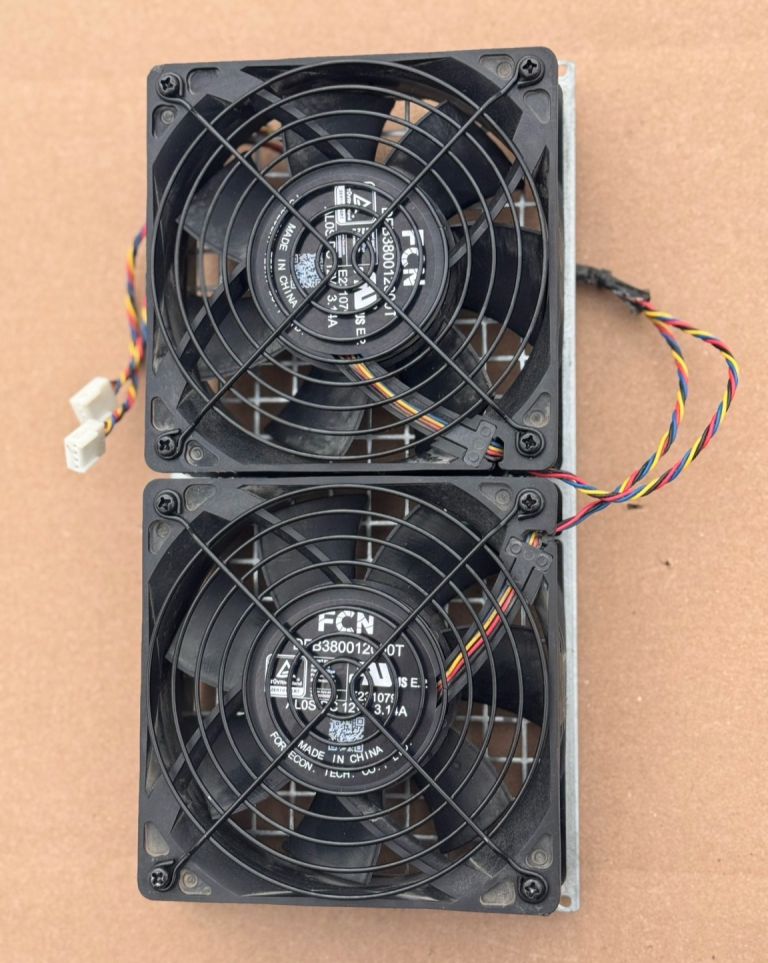
Listen for bearing noise on the monthly check, and watch fan RPM in the miner’s own interface. When either changes, swap it: a dual fan assembly with backplate is $24.99 in the standard 120 × 120 × 38 mm “12038” format with a 4-pin PWM connector. Buying the assembly rather than loose fans means the swap is a bolt-in.
Against a $159.99 used S19 that is 16% of the machine, and it is the one maintenance purchase that always pays. The fitment trap — identical footprint, different motor and connector behaviour — is in the parts compatibility guide.
Thermal paste: the job most maintenance guides get wrong
You will read that ASIC thermal paste should be replaced every six to twelve months. We do not do that, and we do not recommend it for most operators.
Repasting a hashboard is not a clean; it is a rework operation. It means separating a heatsink assembly that is clamped over dozens of chips, cleaning every die without lifting a component, and re-seating with even pressure. Done well it recovers a few degrees on a board that was already suffering. Done badly — and it is done badly far more often than not — it cracks dies, shears pads, and turns a working board into a $24.99 AS-IS donor.
The honest rule: repaste when a board is already being repaired and you have it apart, not on a calendar. If you are going to do it, do it on a bench with a test fixture to prove the board before and after, or with the full hashboard repair kit. Otherwise clean the dust, fix the airflow, and leave the heatsinks alone.
Power connections: check them, do not upgrade them
The quarterly job on the power side is inspection, not replacement. A connection carrying 13.5 A continuously — which is what a 3,250 W S19 pulls at 240 V — will loosen with thermal cycling, and a loose joint heats, oxidises and then heats faster.
Look for discoloured terminals, a plug that is warm to the touch, and any smell of hot plastic. Re-seat the supply cable and confirm screw terminals are tight. A warm connector is a fault, not a characteristic — the electrical side of this, including circuit sizing, is in the mining safety checklist.
What you should not do is fit a bigger supply as maintenance. A larger unit is for machines being run above factory power on tuned firmware; on a stock machine it changes nothing except what fails first.
Firmware is a decision, not a routine
Update firmware when you have a reason: an efficiency tune you actually want, a security fix, or a feature you will use. Do not update on a schedule, and do not update a fleet the week before you sell it.
Two things worth knowing. Aftermarket firmware genuinely earns money by undervolting — roughly 10% less power for 5% less hashrate is worth about a third of the margin on a thin-margin machine, which is why our S19s ship on a 2,800 W tune rather than the factory 3,250 W. And firmware lives on the control board, so a $19.99 microSD card is often the whole cost of the change.
The risk is the same one every time: a failed flash on a locked control board turns into a $59.99–$159.99 board purchase. Flash one machine, run it for a day, then do the rest. Firmware as a profit lever is quantified in the seven variables that decide whether an ASIC makes money, and the tuning order is in ASIC optimization.
Keep one line per machine, not a maintenance system
For a fleet of any size the record that matters is short: serial, purchase date, firmware, what was replaced and when. That is enough to spot the machine that has eaten three fans in a year, and enough to answer the only question a buyer asks when you resell it.
It matters most at the end of the machine’s life. A used miner with a known history sells; one with none is priced as unknown, which is a real discount, not a sentimental one. What documentation is worth at resale is covered in how to vet an ASIC seller.
When maintenance stops being worth it
Maintenance is worth doing while the machine is worth keeping, and that line is set by the machine’s price rather than by its fault. On a $159.99 used S19, a $24.99 fan assembly is always worth it and a $59.99 hashboard is a judgement call — two boards and a fan is $145 against a $159.99 replacement, so at that point you are rebuilding a machine you could simply buy.
On a $4,200 S21 Pro the arithmetic inverts completely and almost every repair is worth doing. The full repair-or-replace calculation is in why mining hardware fails, and the other half of the question — whether a 34.2 J/TH machine still earns at your power price at all — is in what actually moves mining margin. A machine that cannot cover its own electricity is not a maintenance problem.
Frequently Asked Questions
How often should I clean an ASIC miner?
Quarterly for a full power-down clean in a normal environment, with a two-minute look at the intake monthly. A filtered intake usually turns the quarterly job into an annual one. Clean with the machine unplugged, blow from the intake side outwards, and hold the fans still so compressed air cannot spin them past their rated speed.
Do I need to replace thermal paste on a mining hashboard?
Not on a schedule. Repasting is a rework operation on a heatsink assembly clamped over dozens of chips, and done badly it destroys boards far more often than it recovers performance. Repaste when a board is already apart for repair, ideally with a test fixture to prove it before and after. Otherwise fix dust and airflow instead.
What does yearly maintenance cost per miner?
In a reasonable environment, one $24.99 dual fan assembly or nothing at all, plus about an hour of your time across the year. Against a $159.99 used S19 that fan is 16% of the machine and is the one maintenance purchase that always pays for itself.
Which numbers should I actually monitor?
Three: hashrate against nameplate, reject rate, and the hottest board temperature. A 95 TH/s S19 reading about 63 TH/s has lost one of three hashboards; a rising reject rate with steady hashrate is a pool or network issue rather than hardware; and a board temperature drifting up over weeks warns you about dust before any alarm does.
Should I update ASIC miner firmware regularly?
Only when you have a reason – an efficiency tune, a security fix, or a feature you will use. Aftermarket firmware genuinely pays by undervolting, roughly 10% less power for 5% less hashrate, but a failed flash on a locked control board costs $59.99 to $159.99 to fix. Flash one machine, run it a day, then do the rest.
When is a miner no longer worth maintaining?
When the parts cost approaches the replacement price, or when the machine cannot cover its electricity at your rate. Two hashboards and a fan on a used S19 is about $145 against a $159.99 working machine, so that is a rebuild rather than a repair. On a $4,200 S21 Pro nearly every repair is still worth doing.
More on maintenance
- What Actually Moves Mining Margin: Five Levers, With the Arithmetic
- High-Efficiency Goldshell 4-Box 1200W – All Models – Universal
- Why Your Miner Is Earning Less: Diagnosing ASIC Faults
- High-Efficiency Goldshell 4-Box 1200W – All Models – Universal
Maintenance parts and firmware cards in stock
The consumables and tools this routine actually needs:
- Bitmain Antminer S19 / S20 / S21 Dual Fan Assembly w/ Backplate – Easy Install
- Braiins OS+ MicroSD Card for Antminer S21, S19, S17, T7
- Universal Antminer Multifunctional Test Fixture S9 T15 S15 T17 S17 S19 – US Ship
More in Need Parts, or the full ASIC miner inventory.