
ASIC Miner Fan Tester Multi-Function LCD Antminer Whatsminer Avalon Tool
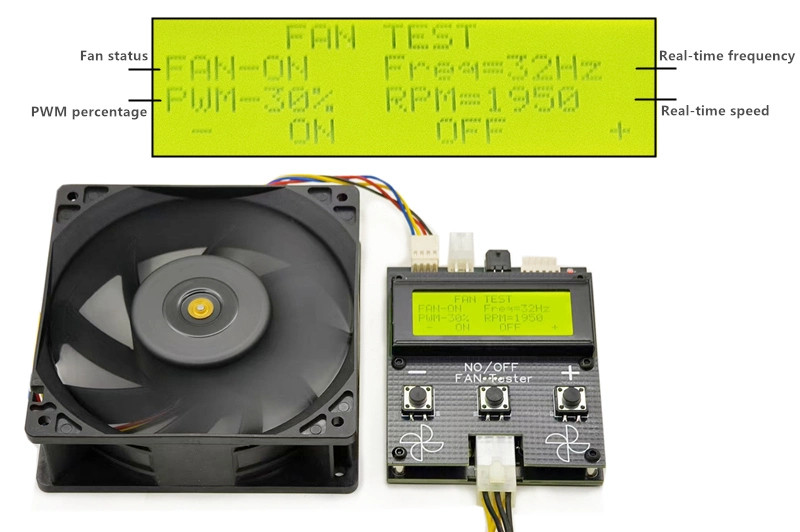
An ASIC miner fan tester: a small bench board that spins a 12 V 4-wire PWM fan on its own, off the machine, and shows you what it is actually doing.
- Reads: fan status, PWM duty as a percentage, PWM frequency in Hz and real-time RPM
- Controls: three buttons to drive the duty cycle up and down and switch the fan on and off while you watch the speed respond
- Why it earns its place: a miner’s fan error only means “I did not see the RPM I expected on this header” — equally true of a seized fan, a broken cable, a chafed tach wire or a dead header
- Connectors: a 4-pin fan header and a 4-pin DC input is what the photograph shows, and that is all we will state. Ask and we will photograph the actual connectors
- Does not include: a fan, or a DC power brick
Price:
$199.99
- Condition graded per unit: new, tested working, refurbished or as-is
- Warranty and returns stated per unit, not per store
- Ships UPS Ground within 7 business days
Description
An ASIC miner fan tester: a small bench board that spins a 12 V 4-wire PWM fan on its own, off the machine, and shows you what it is actually doing. The LCD reports fan status, PWM duty as a percentage, the PWM frequency in Hz, and real-time RPM, and the three buttons let you drive the duty cycle up and down and switch the fan on and off while you watch the speed respond.
ASIC fan tester — what it drives and what it shows
| Fans it drives | 12 V 4-wire PWM |
|---|---|
| Connectors we will state | A 4-pin fan header and a 4-pin DC input, because that is what the listing photograph shows. Other testers in this family are advertised with 6-wire support and several connector shapes and it would be easy to copy that list across — ask and we will photograph the actual connectors first |
| The LCD reports | Fan status, PWM duty as a percentage, PWM frequency in Hz, and real-time RPM |
| Controls | Three buttons: drive the duty cycle up and down, and switch the fan on and off while you watch the speed respond |
| What it answers | Push the duty to 100% and read the RPM. Reaches rated speed and holds it, the fan is fine and your fault is upstream — cable, header or control board. Stalls, runs slow or reports nothing on the tach line, you have your answer |
| Not included | A fan, and a DC power brick. The tester supplies the fan; it does not come with one unless we tell you it does |
| Condition and warranty | Not stated in this listing, so nothing here claims either. Ask before you buy and we will tell you what we actually have — new sealed, opened, bench-tested or untested — and put any coverage in writing |
Why a fan tester earns its place on an ASIC repair bench
Fans are the most common single point of failure on a running miner — they are the only major moving part, they run continuously in dust, and they are the cheapest thing in the box. The problem is that the machine’s own error is almost useless for diagnosis. A miner that halts on a fan fault is telling you “I did not see the RPM I expected on this header”, and that is true whether the fan is seized, the cable is broken, the tach wire has chafed, or the fan header on the control board has failed. Swapping a good fan in tells you something; swapping a fan in that turns out to also be bad tells you nothing and costs you an hour.
Off the machine, it takes about thirty seconds. Put the suspect fan on the tester, push the duty to 100%, and read the RPM. If it reaches its rated speed and holds it, the fan is fine and your fault is upstream — cable, header, or control board. If it stalls, runs slow, or reports nothing on the tach line, you have your answer and you can order the part. It is also the right way to check a replacement fan before you fit it, which matters more than people expect when fans arrive from the same channels the miners do.
What we will and will not claim about connector support
The listing photograph shows a 4-pin fan header and a 4-pin DC input, and that is what we are prepared to state. Other testers in this family are advertised with 6-wire support and several connector shapes, and it would be easy to copy that list across — but if you buy this for a 6-pin Whatsminer fan and it arrives with only a 4-pin header, that is our fault, not yours. Ask us and we will photograph the actual connectors on the unit before you commit. Similarly, the tester supplies the fan; it does not include a fan or a DC power brick unless we tell you it does.
Related bench tools
If you would rather have one instrument that covers more ground, the K3L multi-function hashboard tester and the universal hashboard tester with EEPROM editing both handle hashboard diagnosis as well. For the fans themselves we stock S19 / S20 / S21 dual fan assemblies with backplates. Full bench inventory is in repair parts and tools, and the machines are on the miner list.
Condition and warranty
This listing does not state a condition grade or a warranty term, so we are not going to imply one. Before you buy, ask us and we will tell you what we actually have — new sealed, opened, bench-tested, or untested — and put any coverage in writing. Ask us about this unit.
Questions buyers ask about this part
Is this a complete, working machine?
No. This listing is on the parts and repair shelf, which holds both brand-new spares and bench tools and as-is units sold for repair. Which of those this one is, is stated in the description above — read it before you order, and ask us on +1 (781) 577-0377 or ns@ingmining.com if anything about compatibility with your fleet is unclear. We would rather answer the question than take a return.
What should I check the day it arrives?
Photograph the pallet or box before you open it, keep the packaging, and run the 48-hour acceptance test straight away. Freight claim windows are short, and a fault found on day two is a conversation while a fault found on day thirty is an argument. Our own six-step bench procedure is published in full, so you can repeat exactly what we did.
Shipping cost for this exact item, and how warranty and returns work here, are answered in the Shipping & buying tab on this page. Anything else, ask a person on +1 (781) 577-0377 or ns@ingmining.com — we would rather talk before you buy.
Related hardware and where this sits in the store
Parts, fixtures and tools that go with the same repair job:
- Whatsminer M20 M30 Series Test Fixture Diagnostic Tool Hash Board Tester
- Antminer B8 Hashboard Tester EEPROM Fan PSU Test Tool English Version
- K3L Multi-function Antminer Hashboard Tester S19 S21 T21 KS3 KS5 RI Probe
Category: Need Parts.
A fan fault only tells you the miner did not see the RPM it expected on that header. The parts guide covers what that actually rules in and out, and why S19 and S21 fans share a footprint without sharing a current rating.
Where this listing sits
This one is on the parts and repair shelf. That shelf holds two different things: brand-new spares and bench tools, and as-is units sold for repair. Which of the two this listing is, is stated in its own description — read it before you order.
What our grades mean
These are the only words we use, and each one means a specific thing. They are not interchangeable and we do not soften them to move stock.
| New | Unused stock. Factory sealed unless the listing says otherwise — “new, open box” means exactly that, and the listing will say it. |
|---|---|
| Tested working | Second-hand, and it ran on our bench at the hashrate the listing states. We measured it; we are not repeating what the last owner told us. Expect cosmetic wear. |
| Refurbished | Tested working, plus work done: cleaned, thermal paste and fans dealt with, failed components replaced. The listing says what was actually done to that unit rather than using the word as decoration. |
| As-is / for parts | Sold with no working claim at all, at a price that reflects it. Buy these to repair or to harvest. If a listing says as-is, assume it does not hash until you have proved otherwise. |
| Untested | We have it, we have not powered it, and we are not going to pretend we did. Rarer than as-is and always stated explicitly. |
What a grade here does not mean
- Cosmetic wear is not a fault. Dust, scratches, scuffed labels and discoloured plastics are normal on hardware that has been earning. We photograph what we have; if the pictures matter to you, ask for more and we will take them.
- A grade is not a warranty. Warranty terms are stated per listing, never per store — see the Shipping & buying tab. A tested-working grade describes what the machine did on our bench, not what we owe you in six months.
- A boosted hashrate is not a spec. Where a unit ships on tuned firmware we say so and we give the factory figures too, because overclocking raises power faster than it raises hashrate — a tuned machine is less efficient per terahash than stock, not more.
- We will not invent a grade to fill a field. If a unit came in without history and has not been through the bench, its listing says that.
How the grade gets decided
A used-hardware seller who will not tell you how they test is asking you to take the grade on trust. Ours is published: the six-step bench procedure every machine goes through, and the five measurements that get recorded — per-board hashrate, chip count, measured wall power rather than the nameplate figure, hardware error rate, and temperature under sustained load. When it reaches you, run the 48-hour acceptance test straight away, while the freight claim window is still open.
Buying second-hand for the first time? How to buy a used ASIC miner without getting burned is the long version, written from the repair bench rather than from a spec sheet.
Shipping
Shipping this item inside the United States costs $49.99 by UPS Ground — that is the rate the checkout will charge, read from the store’s own shipping settings, not an estimate. Orders ship within 7 business days.
Outside the United States the checkout quotes a flat international rate. On multi-unit or pallet orders, contact us before ordering so freight to your destination can be confirmed properly. What to check when the pallet arrives, and how a freight claim works, is covered in the mining hardware shipping guide.
What to do the day it arrives
Photograph the pallet or the box before you open it, and keep the packaging until you are satisfied. Freight claim windows are short, and damage found on day two is a conversation while damage found on day thirty is an argument.
Then run the 48-hour acceptance test straight away, while that window is still open. It is the same ground our own bench covers, so you can compare like for like: how the grade on this listing was arrived at, and the five measurements we record, are set out in the Condition & grading tab on this page.
Condition, warranty and returns
Condition: Repair part or bench tool — this shelf holds both new spares and as-is units, so read the condition stated in the description.
Warranty is stated per listing, not across the catalogue. Some units carry a manufacturer term and say so above, naming the term and the date it runs from. Many units, particularly used and AS-IS stock, carry none, and those listings do not claim one. There is no blanket warranty covering a catalogue that runs from sealed factory stock to a hashboard sold for parts. For what a mining warranty normally covers, see ASIC miner warranty explained.
Returns: ask for the terms on this unit before you pay. No single returns window is published for the whole store, because the sensible terms on a tested working machine and on a board sold AS-IS for parts are not the same terms. Email or call and ask what applies to this exact item — it is a two-minute conversation and a great deal cheaper than a dispute.
Who you are buying from
ING Mining LLC, Hanson, Massachusetts. ING MINING® is a registered U.S. trademark; our marketplace feedback is on the reviews page and the longer version of who we are is on about. Reach a person on +1 (781) 577-0377 or ns@ingmining.com.
Our Related Products
Related products
-
Add to WishlistAdd to Wishlist
-
Add to WishlistAdd to Wishlist
-
Out Of StockAdd to WishlistAdd to Wishlist
-
Add to WishlistAdd to Wishlist
Reviews
There are no reviews yet.