
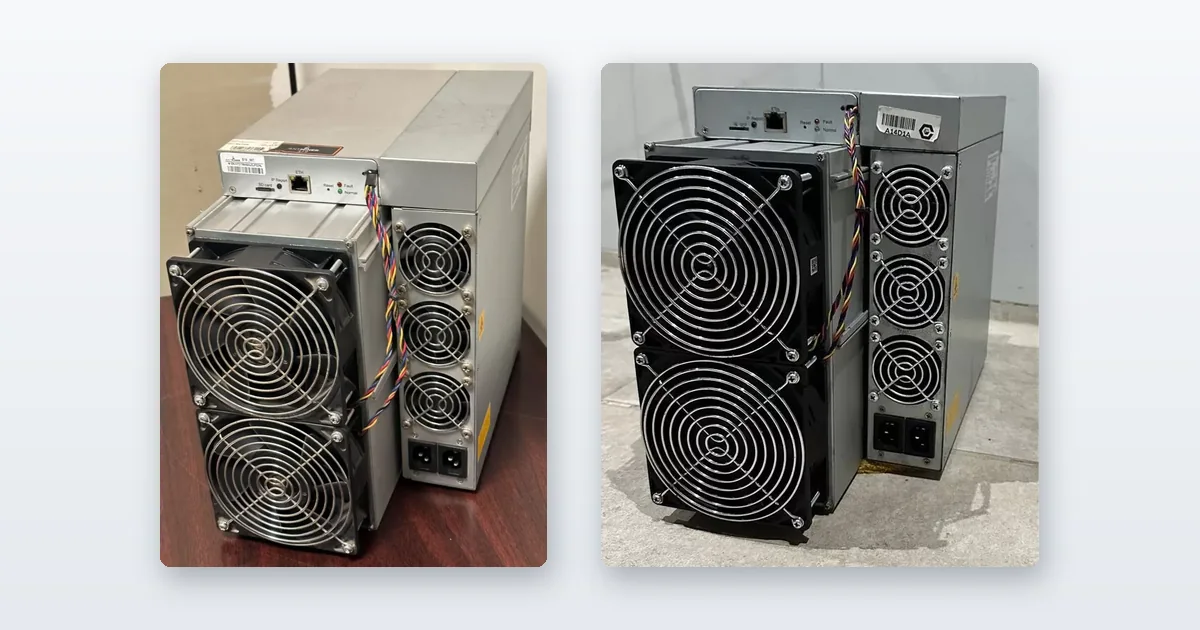
Read this before you plug anything in: an Antminer needs a 240 V circuit, a wired Ethernet connection, and power cords that are not in the box. Most first-day failures are one of those three, not a fault with the machine. Everything below is the actual sequence — power, network, IP, login, pool, verify, secure — plus what to check in the first twenty-four hours and the specific things that go wrong. This is one machine. Bringing up a whole lot at once is a different job and is written up at receiving a used miner lot.
We set these machines up, repair them and take them back in when they fail, so this is the version we would talk a customer through on the phone.
Before you start
- 240 V, not 110 V. Every Antminer S19 and S21 is specified for 200–277 V. There is no 120 V mode. If the machine does nothing when you flip the switch, this is almost always why. The exception in our range is the Canaan Avalon Q, which accepts 110–240 V.
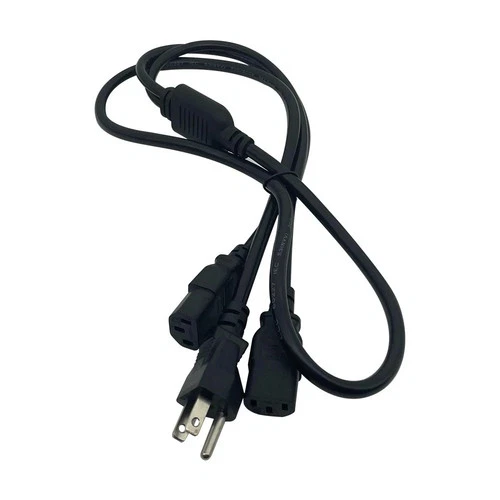
- Power cords are not included, because 240 V receptacles vary by country and by installation. Buy cords that match both your receptacle and the miner’s PSU inlet — commonly IEC C13 or C19 depending on the supply. Check the PSU, not the marketing photo.
- Wired Ethernet only. There is no Wi-Fi. Run a cable to a router or switch.
- Size the circuit properly. An S19 draws about 13.5 A at 240 V, and because it is a continuous load the circuit should be sized at roughly 125% of that. Do not share a circuit with anything else.
- Plan the noise and heat now. An S19 is around 75 dB and dumps 3,250 W of heat continuously. If that is a problem, it is a much bigger problem after the machine is running — see what actually works at home.
Step 1 — Power and network
- Connect the PSU to the miner, and check every hashboard cable is fully seated. Loose PCIe connectors are a common cause of a board not showing up.
- Plug the PSU into a 240 V outlet with the correct cords.
- Run an Ethernet cable from the miner to your router or switch.
- Switch on. The fans will run at full speed and then settle. Allow 3–5 minutes for a full boot before assuming anything is wrong.
Step 2 — Find the miner’s IP address
The miner requests an address from your router by DHCP. To find it:
- From a computer on the same network, open your router’s admin page — commonly
192.168.1.1or192.168.0.1. - Open the attached or connected devices list.
- Look for an entry named Antminer, Bitmain, or an unnamed device that appeared when you powered the miner on. Note its IP.
If it is not there, unplug the miner’s Ethernet cable, refresh the device list, plug it back in and refresh again — the new entry is your miner. Bitmain machines also have an IP report button on the control board that makes the machine announce itself to a listening tool on the same subnet.
Step 3 — Log in
- In a browser, go to
http://followed by the miner’s IP address. - The factory credentials on Bitmain machines are username root and password root.
On a used machine, assume the credentials have been changed. If root/root is refused on a second-hand unit, it has a previous owner’s password on it. Ask the seller — and if nobody has it, the machine needs a firmware reflash rather than guessing. This is one of the questions worth asking before buying, and it is on the list in how to buy a used ASIC miner.
Step 4 — Configure the pool
A miner on its own earns nothing. You need a pool account, because solo mining a modern block is a lottery with odds you should not plan around.
- Open Miner Configuration.
- Enter your primary pool in Pool 1, and put backups in Pool 2 and Pool 3. Use different pools for the backups, not different servers at the same pool — the point is to survive one pool going down.
- Click Save & Apply and let the miner restart.
The three fields are always the same shape: a stratum URL, a worker name and a password. The password field is almost always ignored and conventionally set to x. The worker name is usually your account name, a dot, and a label for that machine — label them by physical position now, because at machine number ten you will want to know which one is faulting.
Create the account first at your chosen pool — Braiins Pool, Antpool, F2Pool and ViaBTC are the common ones — then copy that pool’s recommended stratum address for your region. A geographically closer server measurably reduces stale shares.
Step 5 — Verify it is actually hashing
Open Miner Status and check four things, not one:
- Pool status is Alive on your primary pool.
- Accepted shares are increasing. A rising counter is the only real proof it is working.
- All hashboards are present. Most S19-class machines have three. If you see two, you have a hardware problem, not a configuration problem — stop and investigate.
- Hashrate is near the rated figure after 30–60 minutes. It ramps, so do not judge it in the first five.
Then check the pool’s own dashboard after an hour. The miner reporting a hashrate and the pool crediting you for it are two different claims, and only the second one pays.
Step 6 — Change the password and keep it off the internet
- Go to System or Administration, then Password.
- Change the default to something strong.
- Never port-forward a miner to the public internet. Keep it on a private LAN and use a VPN if you need remote access.
This matters more than it sounds. Miners exposed to the internet with default credentials are found and reconfigured to mine to someone else’s wallet, and the symptom is subtle — the machine keeps hashing happily and you simply stop being paid. Check your worker still points at your account whenever payouts look wrong.
The first twenty-four hours
- Watch temperatures. Chip temperatures climbing steadily rather than plateauing means an airflow problem: intake blocked, filter clogged, exhaust recirculating back to the intake, or a fan not spinning.
- Watch the hardware error rate. A persistently rising error count points at a hashboard, not at your setup.
- Compare the pool’s reported hashrate against the machine’s after a few hours. A large persistent gap usually means stale shares from a distant pool server or a network problem.
- Measure the actual wall draw with a meter if you can. On used or firmware-tuned machines the real figure is often not the datasheet figure, and it is what your electricity bill will be based on.
Troubleshooting the common first-day failures
- Nothing happens at all. You are on 110 V, or the PSU cords are wrong. This is the single most common call we get.
- No IP appears. Bad cable, wrong switch port, or DHCP exhausted on the router. Try a different port and cable before suspecting the miner.
- Pool shows Dead. Re-enter the stratum URL, worker and password exactly — a trailing space is the usual culprit. Try a different regional server. Confirm outbound port 3333 or 443 is not blocked.
- Only two of three hashboards detected. Power down, reseat the board’s data and power connectors. If it stays missing, the board needs testing — see what breaks and what to stock, and the fixtures in repair parts.
- Hashrate well below rated. Check for a missing board first, then temperature throttling, then whether the firmware is running a reduced-power profile from a previous owner.
- Fans at full speed constantly. Either high ambient temperature or a failed fan the controller is compensating for. A fan tester settles it in a minute, and spare fan assemblies are worth having before you need them.
Before all of this is worth doing, check the machine can earn at your electricity price — the arithmetic is in the ASIC miner buying guide and every machine is ranked by it here. Our stock is in the full inventory, and if you get stuck on any step, tell us where.
Frequently Asked Questions
Why won’t my Antminer turn on?
Almost always because it is plugged into 110 V. Every Antminer S19 and S21 is specified for 200–277 V and has no 120 V mode, so on a standard North American house outlet it simply does nothing. The second most common cause is the wrong power cords, which are not included because 240 V receptacles vary — check the PSU’s inlet type rather than assuming IEC C13 or C19.
How do I find my Antminer’s IP address?
Open your router’s admin page, usually at 192.168.1.1 or 192.168.0.1, and look at the attached devices list for an entry named Antminer or Bitmain, or an unnamed device that appeared when you powered the miner on. If nothing shows, unplug the miner’s Ethernet cable, refresh the list, plug it back in and refresh again — the new entry is your miner.
What is the default Antminer login?
Username root and password root on Bitmain machines from the factory. On a used machine assume it has been changed: if root/root is refused, a previous owner set a password and you need it from the seller or the machine needs a firmware reflash. Change the password immediately after your first login and never expose a miner to the public internet.
How do I know my miner is actually working?
Check four things on the Miner Status page rather than one: the pool shows Alive, accepted shares are increasing, all hashboards are detected (three on most S19-class machines), and hashrate is near the rated figure after 30 to 60 minutes. Then confirm on the pool’s own dashboard after an hour — the miner reporting hashrate and the pool crediting it are different claims, and only the second one pays.
Do I need a mining pool?
In practice yes. Mining is a lottery in which each attempt has the same tiny chance of finding a block, so a single machine mining alone may go years without a payout. A pool combines many participants’ work and distributes rewards in proportion to contribution, turning that lottery into steady income. Set a primary pool and at least one backup at a different provider, so one pool going offline does not stop you earning.
Why is my hashrate lower than the rated figure?
Check in this order: whether a hashboard is missing, whether the machine is throttling on temperature, and whether the firmware is running a reduced-power profile left by a previous owner. A missing board on a three-board machine costs roughly a third of the hashrate and is a hardware fault, not a setup problem. Note also that machines ramp up over 30 to 60 minutes, so do not judge output in the first few minutes.