
Antminer S19 Power Requirements: 240V, Amps and Breakers
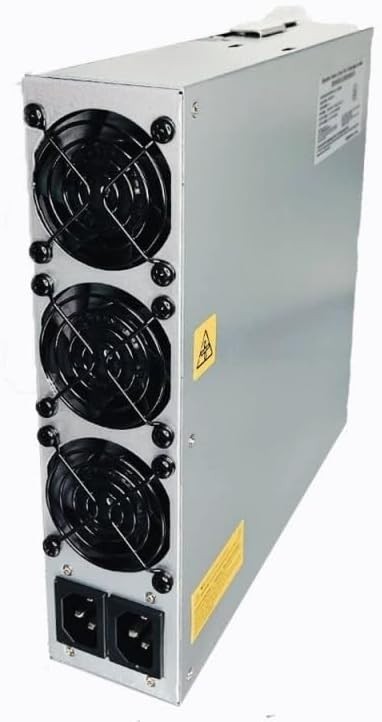
Antminer S19 power requirements start with one non-negotiable fact: this is not a 120-volt appliance. A stock S19 or S19 Pro is rated for 200–240 V AC and draws about 3,250 watts at the wall. It also uses two power cords. Before you buy the miner, you need a suitable circuit, the correct receptacle or PDU, and an electrician who understands continuous equipment loads.
That sounds more complicated than it is. The important numbers are voltage, total watts, current, cord count, and the capacity of everything upstream. This guide explains each one without pretending that a universal shopping list can replace the nameplate on your machine or the electrical code where you live.
Antminer S19 power requirements from Bitmain
Bitmain’s own S19 and S19 Pro setup specification lists a 200–240 V AC input range, 47–63 Hz frequency, and 3,250 W wall power at 25°C with a ±5% tolerance. The same document lists two AC input wires at 10 A per wire under its maximum condition.
Do not read “two wires” as two separate miners or two optional feeds. The integrated APW12 power supply expects both cords. Plugging in only one side can overload a cord or prevent the miner from operating correctly. Likewise, a familiar-looking connector does not make a household 120 V outlet suitable.
| Model | Rated wall power | Input voltage | Energy at 24/7 operation |
|---|---|---|---|
| Antminer S19 95T | 3,250 W ±5% | 200–240 V AC | 78 kWh per day |
| Antminer S19 Pro 110T | 3,250 W ±5% | 200–240 V AC | 78 kWh per day |
| Antminer S19k Pro 120T | 2,760 W ±5% | 200–240 V AC | 66.24 kWh per day |
The S19k Pro figure comes from Bitmain’s separate S19k Pro specification. That difference matters. “S19” describes a family, not one electrical load. Therefore, always use the label and firmware profile on the unit you will run.
How many amps does an Antminer S19 use?
For a quick estimate, divide watts by volts. A 3,250 W miner at 240 V draws about 13.5 A in total. At 208 V, the same power equals about 15.6 A. In an ideal, evenly shared setup, each of the two cords carries about half that total.
| Supply voltage | 3,250 W S19 current | Approximate current per cord |
|---|---|---|
| 240 V | 13.5 A total | 6.8 A |
| 230 V | 14.1 A total | 7.1 A |
| 208 V | 15.6 A total | 7.8 A |
Those are planning numbers, not breaker instructions. Real input can move with supply voltage, temperature, PSU efficiency, silicon variation, and firmware settings. Bitmain also publishes a ±5% power tolerance. In addition, electrical rules often treat equipment that runs for hours at a time differently from short loads.
Consequently, the safe question is not “Will the miner fit under the number printed on my breaker?” It is “Can this complete branch circuit carry the measured load continuously with the required margin?” Your electrician should answer that after checking the panel, conductors, breaker, receptacle, grounding, and local rules.
Why a regular 120 V outlet is the wrong starting point
The Antminer S19 power requirements specify 200–240 V. A travel adapter changes the plug shape; it does not raise voltage or create circuit capacity. An extension cord has the same limitation. Feeding this miner from an unsupported voltage can stop the PSU from starting, overheat unsuitable equipment, or damage the machine.
If your mining space has only ordinary 120 V receptacles, pause there. Ask an electrician whether the panel can support a new 240 V branch circuit and whether the room can remove the heat. Our broader ASIC miner power requirements guide explains the site-level questions before you choose a model.
Breaker, receptacle, PDU, and cord: the whole path matters
A miner does not plug into a breaker. Power travels through a chain: panel, breaker, conductors, receptacle, PDU or splitter, cords, connectors, and finally the PSU. The lowest-rated or poorly terminated part can become the failure point.
Start with the actual nameplate
Used S19 units can arrive with different APW12 revisions or firmware profiles. Read the PSU label and record its voltage range, maximum input, connector type, and cord count. Then compare those details with the product listing. If they disagree, stop and resolve the mismatch before energizing the miner.
Use two correctly rated power cords
Both cords should match the PSU inlet and the receiving PDU or receptacle. They also need a suitable voltage, temperature, and current rating. Avoid mystery cords with no legible markings. Moreover, do not mix one light cord with one heavy cord and assume the load will divide safely.
Choose a PDU by more than outlet count
A rack PDU may have enough sockets yet lack enough total capacity. Check its input rating, branch limits, plug type, outlet type, and whether both S19 cords land on the intended circuit. For a multi-miner rack, label every cord at both ends. That small job prevents mistakes during maintenance.
Do not ignore connections and heat
Loose terminals create resistance, and resistance creates heat. After commissioning, inspect cords and connectors for discoloration, softened plastic, odor, or unusual warmth. An infrared camera can help, but it does not replace a properly torqued installation. Shut down and investigate anything abnormal.
What overclocking changes
Firmware can change both hashrate and wall power. A profile that pushes an S19 beyond stock settings may also push the circuit, PDU, or cord beyond the plan you made from the factory number. Therefore, measure at the wall after every tuning change.
Underclocking can reduce the load, but never use a software setting as the only safety control. Someone can reset the profile, replace the control board, or load another configuration. Size the electrical path for the maximum operating state you intend to permit.
If you are comparing stock and tuned machines, read our ASIC optimization guide. It puts firmware after power and cooling, where it belongs.
One miner, five miners, and ten miners
Scaling is simple arithmetic, but infrastructure rarely scales in a straight line. One stock S19 represents about 3.25 kW. Five represent 16.25 kW, and ten represent 32.5 kW before networking, ventilation, or cooling equipment. At that point, phase balance, panel capacity, distribution, and fault isolation matter as much as the miner plugs.
| Stock S19 count | Miner load | Daily miner energy |
|---|---|---|
| 1 | 3.25 kW | 78 kWh |
| 5 | 16.25 kW | 390 kWh |
| 10 | 32.5 kW | 780 kWh |
Before scaling, meter one unit for several days in the real room. Confirm voltage under load, actual watts, connector temperature, noise, and exhaust temperature. Then use those measured results to design the next stage. Buying one machine first is often cheaper than redesigning a ten-machine room.
Antminer S19 power checklist before you buy
- Confirm the exact S19 model, PSU revision, and intended firmware profile.
- Verify that the available supply falls inside the nameplate voltage range.
- Have a qualified electrician review circuit and panel capacity.
- Use both required cords, with legible and appropriate ratings.
- Check the full path: breaker, conductors, receptacle, PDU, cord, and inlet.
- Plan for 24/7 energy use and the matching heat output.
- Measure wall power and connector temperature after commissioning.
Once the site is ready, compare the condition notes on our used and refurbished ASIC miners. If you want to test the room before committing to a lot, start with one unit and record what it actually does.
Frequently asked questions
Can an Antminer S19 run on 110 or 120 volts?
No. Bitmain specifies 200–240 V AC for the S19 and S19 Pro. A plug adapter or ordinary extension cord does not convert a 120 V circuit into the supported supply.
Does an Antminer S19 need two power cords?
Yes. The integrated APW12 setup uses two AC input cords. Both must match the PSU inlet and the site’s power-distribution equipment.
How much electricity does an S19 use each day?
A stock 3,250 W unit running continuously uses about 78 kWh per day. Multiply 78 by your delivered electricity price to estimate the daily energy cost.
Can I use a 20 A circuit?
Do not decide from the breaker label alone. Voltage, continuous-load rules, actual wall power, conductor size, receptacle, PDU, and local code all matter. Give the machine’s nameplate and Bitmain specification to a qualified electrician.
Will Braiins OS change the electrical requirement?
It can. Any firmware profile that changes watts changes current and heat. Measure the miner at the wall after tuning, and never let a software limit replace correctly sized electrical equipment.
Safety note: This article explains planning numbers; it is not a site-specific electrical design. Electrical work can cause fire, injury, or equipment damage. Use a licensed professional and follow the rules that apply at your location.