
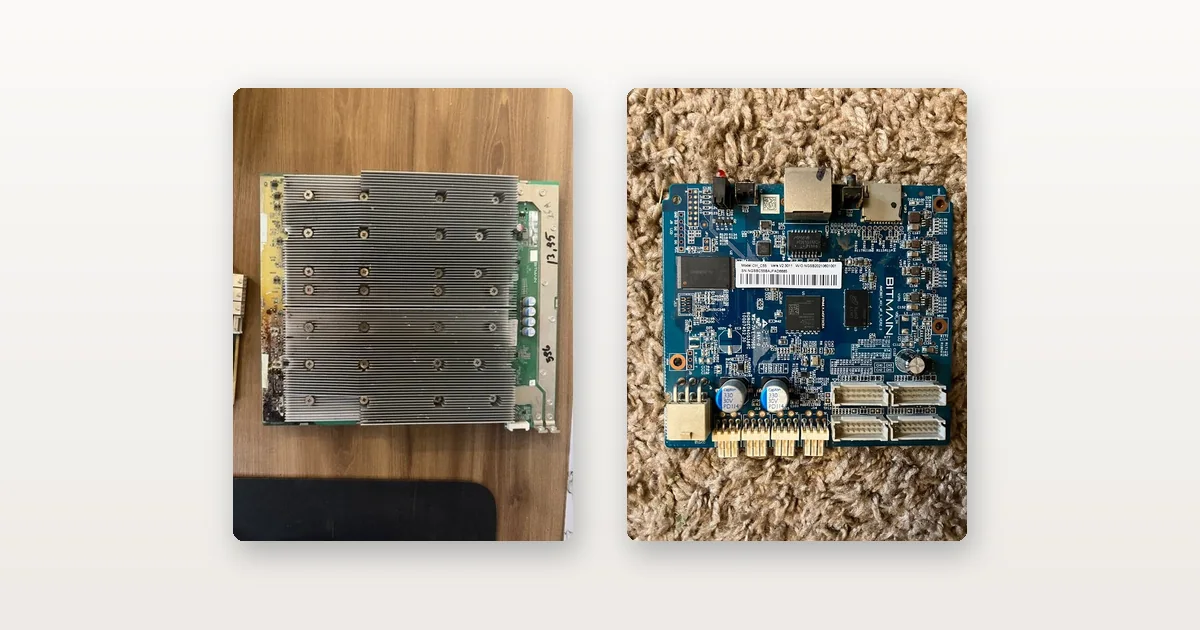
An ASIC test fixture exists to turn a guess into a measurement. When a miner
stops earning, the machine itself will point you at a suspect — a board down, a
fan error, a supply that restarts under load — but it will not tell you whether
the suspect is actually guilty. Swapping parts on a hunch is how a $24.99 fault
gets a $599.99 repair. This page is the bench side of that problem: for each part
of a miner — PSU, fans, hashboards, chips, control board — which tester actually
proves the fault, what it costs, and when a known-good spare is the cheaper
instrument. Everything named here is gear we bench with ourselves and stock.
This page starts where the symptom ends. If the machine is still running but
earning less, start with why
your miner is earning less, which works from symptom to suspect part. If the
machine just arrived, run the first-48-hours
acceptance test instead — a fault found in the claim window is the seller’s
problem, not a repair. And the six-step procedure every used unit goes through
before we ship it is written up in
how we bench-test an ASIC before it ships.
The cheapest test bench is a box of known-good parts
For one machine, the honest advice is that you do not need a fixture at all.
The three highest-probability faults on an S19-class machine can all be proven by
substitution, and the substitutes together cost less than any tester:
- A dual fan assembly with backplate
is $24.99. Fans are the only moving parts in the box and the most common failure. - A tested Antminer control board
is $59.99 — and control-board failures mimic everything else, so it is the
substitution that settles the most confusing symptoms. - A tested-working S19 hashboard
is $59.99. If the machine comes back to full rate with the spare in that slot,
the pulled board is the fault; if the same slot still misbehaves, the board was
never the problem — it is the connector, the cable, the supply rail or the
control board, and you just avoided paying to repair a healthy board.
That last case is the substitution trap worth knowing in reverse: a slot that
kills every board you put in it is not consuming a run of bad boards, it has a
fault upstream of the board. Prove the slot before you condemn a second part.
Substitution stops being the right answer when the same fault keeps arriving.
At fleet scale, a failure is a rate rather than an event, and the repair-or-scrap
arithmetic — and what to keep on the shelf — is set out in
what breaks at industrial scale.
The rest of this page is the fixture ladder for when the bench does pay.
Power supplies: unloaded, almost every PSU looks healthy
The defining problem of PSU diagnosis is that an APW12 sitting on a bench with
no load will often look perfectly fine right up until it is asked to deliver
current. The machine-side symptom — restarts under load, a board dropping out
intermittently, a miner that will not start after a power cut — is described on
the symptom page; the proof is a
$299.99 APW12 PSU tester
that applies the correct enable signal and a load to the supply outside the
miner, so you can watch it come up, hold its output and either survive or fold.
It answers one question definitively: is the PSU actually dead, or is the fault
somewhere else? That answer is worth having before you spend several hundred
dollars on a replacement supply, because a lot of the time the answer is
“somewhere else”.
Fans: split “dead fan” from “board not driving it”
A fan that is not spinning has two possible causes on opposite sides of the
machine: the fan, or the control board that drives it. A
$199.99 fan tester
settles it by running the fan entirely off the machine — it powers a 12 V
4-wire PWM fan on its own, displays duty cycle, PWM frequency and live RPM, and
lets you sweep the duty up and down while watching the speed respond. A fan that
tracks the sweep is healthy, and your fault is the control board; a fan that
does not is a bearing or winding, and the fix is a $24.99 assembly.
For a single suspect fan you do not even need that: spin it by hand. Grinding,
resistance or play in the hub is a bearing on the way out. The tester earns its
place when fans arrive by the box and each one needs a verdict before it goes on
a shelf as a known-good spare.
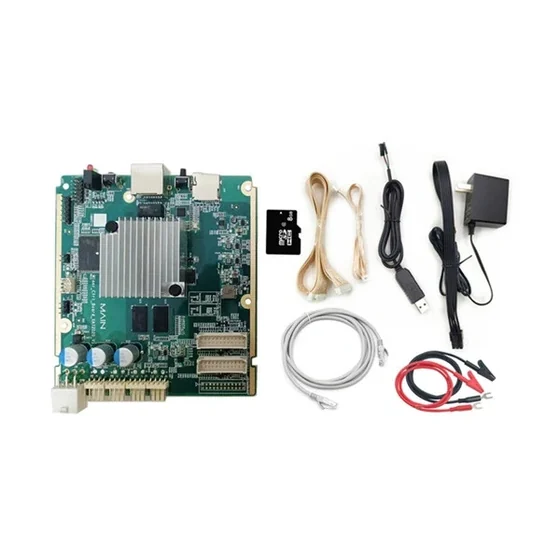
Hashboards: the fixture is what turns repair from guessing into work
A hashboard fixture powers and clocks a board outside the miner, walks the
chain of chips, and reports which chips answer and where the chain stops. That is
the difference between “board 2 is bad” and “chip 41 in domain 5 is dead” —
and only the second sentence is a repair instruction. The ladder, cheapest
first:
- The universal Antminer fixture
($199.99) covers the S9 through S19 generations and reports failed ASIC
positions over a serial link to a PC. - The K3L multi-function tester
($459.99) covers S19, S21 and T21 boards plus KS3 and KS5, and adds an RI probe
for checking voltage domains against expected values — so a shorted or open
domain is found before full power is ever applied to the board. - The K8 and
K9 multifunction testers ($400 each)
fold PSU and signal-fault testing into the same bench; the K9’s coverage list
runs past seventy machine models, which is what a mixed-fleet repair bench
actually needs. - The universal tester with EEPROM editing
($599.99) is the one that returns boards to service rather than just condemning
them. Every hashboard carries an EEPROM holding its identity and calibration
— chip count, frequency, voltage, serial — and when that data corrupts, a
physically perfect board reports as missing or refuses to initialise.
Check the EEPROM before you reflow anything: a meaningful share
of “dead” boards are healthy boards with scrambled paperwork.
Two traps to keep off the invoice. The
$59.99 “test fixture” microSD card
is the file set for a fixture, not the fixture — on its own it does nothing,
and the listing says so in bold. And fixtures are brand-specific:
Whatsminer boards need the
M20/M30-series fixture
($299.99) and IceRiver KS-series boards their
own test kit
($249.99); an Antminer fixture proves nothing about either.
Which board fits which machine — and which chip family a board belongs to,
which decides everything about interchangeability — is the
Antminer parts compatibility guide’s
job. Donor stock exists for exactly this bench: an
AS-IS S19 XP-class board
is $24.99 as chips, heatsinks and connectors, sold untested and labelled that
way, while a
tested 110 TH-class S19 Pro board
is $169.99 as a working replacement.
Chips: the last rung, and only after the fixture has named one
Chip-level work is where most bench stories go wrong, so the order matters: a
chip tester is only useful after a fixture has isolated a dead position.
The BM1366-series chip tester
($599.99) sockets a single chip and returns a plain PASS or ERROR — it covers
the BM1366 variants used on S19 XP, S19 XP Hydro and S19k Pro boards, and its
own listing is explicit that it does not cover the BM1368AA used
on the S21 generation. Suffixes are not interchangeable, and
replacement BM1368AA chips
(five for $55, so $11 a chip) are bare silicon for hot-air rework, not a part
that plugs in. Which BM number is on which board — and why that number is most
of what a used machine is worth — is covered in
the BM chip ladder.
Do not buy chips to guess with. Isolating the dead domain first is the
difference between an $11 repair and a board full of reflowed chips that still
does not hash.
Control boards: substitution beats instrumentation
A control board has no partial symptom — the machine answers or it does not
— and when it fails it impersonates every other fault: no web interface, no IP,
phantom fan errors, hashboards reporting absent when they are healthy. That
symptom list is why the $59.99
tested control board
is the best diagnostic instrument on this page per dollar: substitute it, and
the machine either comes back — case closed — or it does not, and every
“impossible” symptom you were chasing was never the control board at all. For
Avalon fleets the same logic runs through a genuine
Avalon 1166 Pro control board
($159.99).
Component-level control-board repair exists, but it is a different trade: the
AM3352 chip tester
($1,299.99) proves whether the TI Sitara processor on BeagleBone-style Antminer
control boards is alive before it is committed to a board. Unless you are
repairing control boards by the tray, the $59.99 substitution is the right
tool.
When the bench pays, in one paragraph
Roughly $145 of known-good parts — a fan assembly, a control board, a tested
hashboard — will settle the three most likely faults on a single S19-class
machine. The full bench — a hashboard fixture, a PSU tester, a fan tester, and
eventually the
20-piece repair kit
($1,399.99, and it includes the fixture, the EEPROM editor, the desoldering
station and the multimeter) — is several machines’ worth of tooling, and it
pays when failures arrive as a rate rather than an event. Where that line falls
for a fleet, and what belongs on the spares shelf next to the testers, is
fleet arithmetic,
not a bench question.
Once the fault is cleared and the miner is stable, the next question is whether it is running as well as it can. Our optimisation walkthrough picks up from there — power delivery, cooling choice and firmware tuning, in that order.
And when the honest answer is that the fault is not worth fixing, the machine has not gone to zero. a unit you have already given up on is still a control board, a supply, a fan assembly and possibly three good hashboards. We buy used hardware outright — working, partly working, or a pallet you have already written off — and the quote needs the model, the count, the condition and where it is sitting.
Frequently Asked Questions
How do I test an ASIC miner hashboard?
On a test fixture matched to the board’s generation. The fixture powers and
clocks the board outside the miner, walks the chip chain and reports where it
stops — a specific chip and voltage domain rather than a dead board. Check the
EEPROM before any rework: corrupted identity data makes a physically healthy
board report as missing or refuse to initialise, and editing it back is a
five-minute fix.
Do I need a test fixture to diagnose one miner?
No. For a single machine, substitution with known-good parts is cheaper and
almost as conclusive: a $24.99 fan assembly, a $59.99 tested control board and a
$59.99 tested hashboard together cost less than any fixture and settle the three
most likely faults. A fixture earns its price when the same faults keep
arriving — a repair bench serving a fleet, not a machine.
How do I know if a miner’s power supply is dead?
Test it under load, off the machine. An unloaded PSU frequently looks healthy
and then folds the moment current is demanded, which is why restarts under load
and boards dropping out intermittently are its classic symptoms. A bench tester
that applies the enable signal and a real load answers definitively whether the
supply holds its output — before you pay for a replacement it may not need.
Why does a healthy hashboard report as missing?
Two common reasons. The board’s EEPROM — which stores its chip count,
frequency, voltage and serial — has corrupted, so the board cannot identify
itself; or the control board on the machine side has failed, which impersonates
missing boards, fan errors and network faults all at once. Substituting a
known-good control board splits the two in one step.
When is a chip-level tester worth buying?
Only after a fixture has isolated a dead position, and only if the tester
covers your chip family — suffixes matter, and a BM1366-series tester does not
cover the S21 generation’s BM1368AA. At $599.99 against a $159.99 working S19,
a chip tester is priced for a bench that repairs boards by the stack, not for a
one-machine fault.
What is the quickest way to test a miner fan?
By hand first: a healthy fan spins freely and silently, and any grinding or
play in the hub is a bearing on the way out. A bench fan tester adds the half of
the answer your hand cannot feel — it drives the fan off the machine, shows
duty cycle against live RPM, and so splits a dead fan from a control board that
has stopped driving it.
Related reading
- Why Your Miner Is Earning Less: Diagnosing ASIC Faults
- Why Mining Hardware Fails: Heat, Dust, PSUs and Repair Costs
- What Actually Moves Mining Margin: Five Levers, With the Arithmetic
- What You Need to Start Mining Bitcoin: The Shopping List
- Antminer BTC miners
The test gear we actually use
Everything below is what we actually bench with, and all of it is in stock:
- APW12 PSU Tester Power Supply Diagnostic Tool for Antminer APW12-12-15
- ASIC Miner Fan Tester Multi-Function LCD Antminer Whatsminer Avalon Tool
- BM1366 Series ASIC Chip Tester BM1366AI AG BP BS Bitcoin Miner Repair Tool
- K3L Multi-function Antminer Hashboard Tester S19 S21 T21 KS3 KS5 RI Probe
More in Need Parts, more machines in Used Miners, or the full ASIC miner inventory.