100% Free — No Subscription Required

eBay Listings on Autopilot.
Powered by AI.

Paste any product URL and ING Listing Engine generates a complete, publish-ready eBay listing in about 10 seconds — title, description, item specifics, photos, and pricing. Then publishes directly to your eBay account.

Windows 10 & 11 No install required Single .exe file No subscription, no expiry
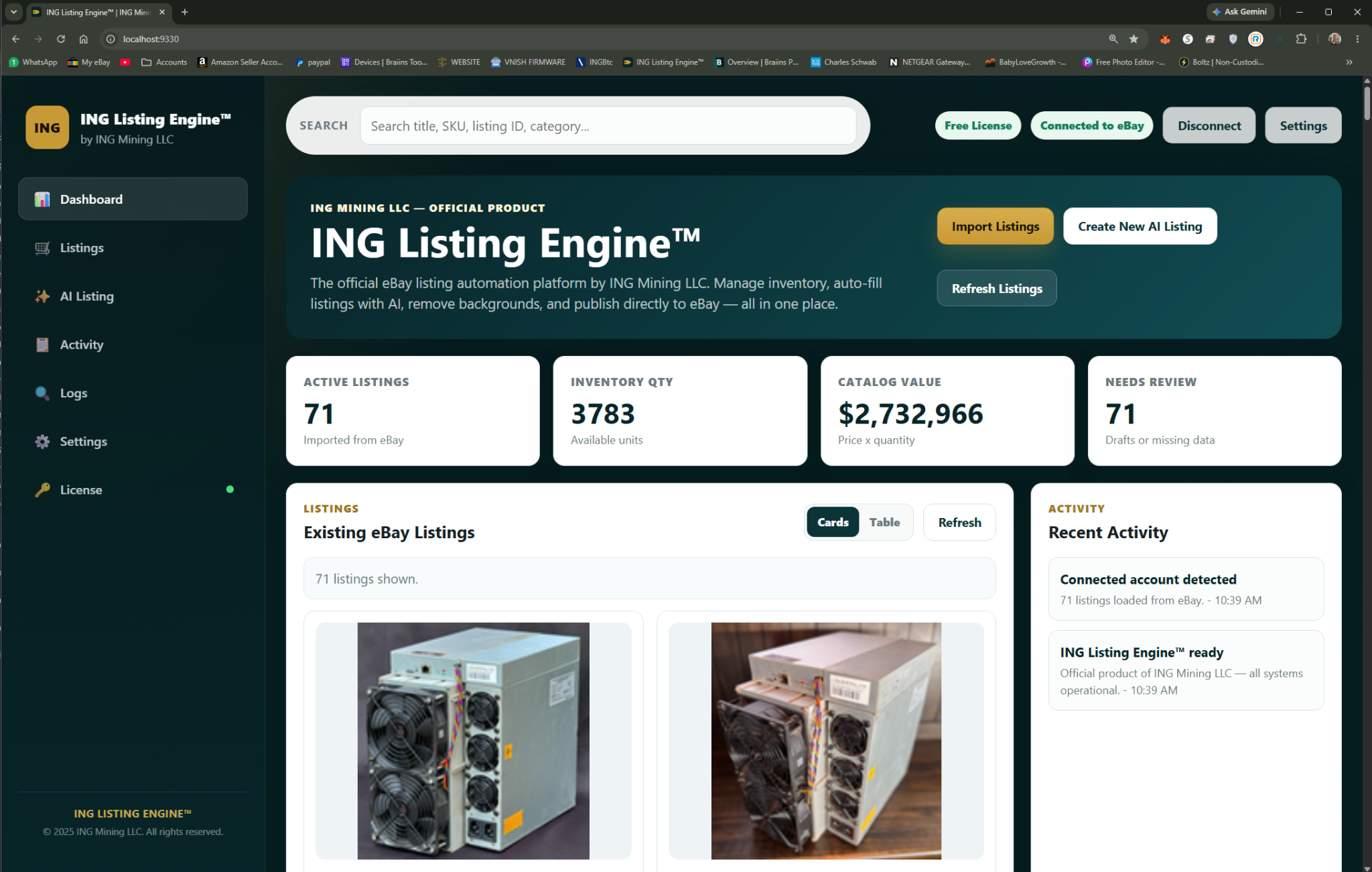
localhost:9330 — ING Listing Engine
ING Listing Engine dashboard overview — main interface showing listing form and photo grid
~10s
Listing Generated
20+
Fields Auto-Filled
1
Click to Publish
$0
Cost — Forever

Three steps. Ten seconds.

No manual typing, no copy-pasting specs, no hunting for category IDs. The AI handles everything.

1

Paste a Product URL

Drop in any URL — your supplier’s page, a manufacturer site, another eBay listing, Amazon, wherever you source product info. The AI reads the full page.

2

AI Fills Everything

Claude AI writes a keyword-optimized title, professional HTML description, selects the right eBay category, fills 20+ item specifics, pulls all product photos, and estimates pricing from current eBay sold data.

3

Review & Publish

Scan the AI-filled listing, make any tweaks you want, then hit Publish. The app connects directly to your eBay seller account via OAuth and creates the live listing instantly.

Every feature, shown.

Real screenshots from the app — click each tab to see exactly what you get.

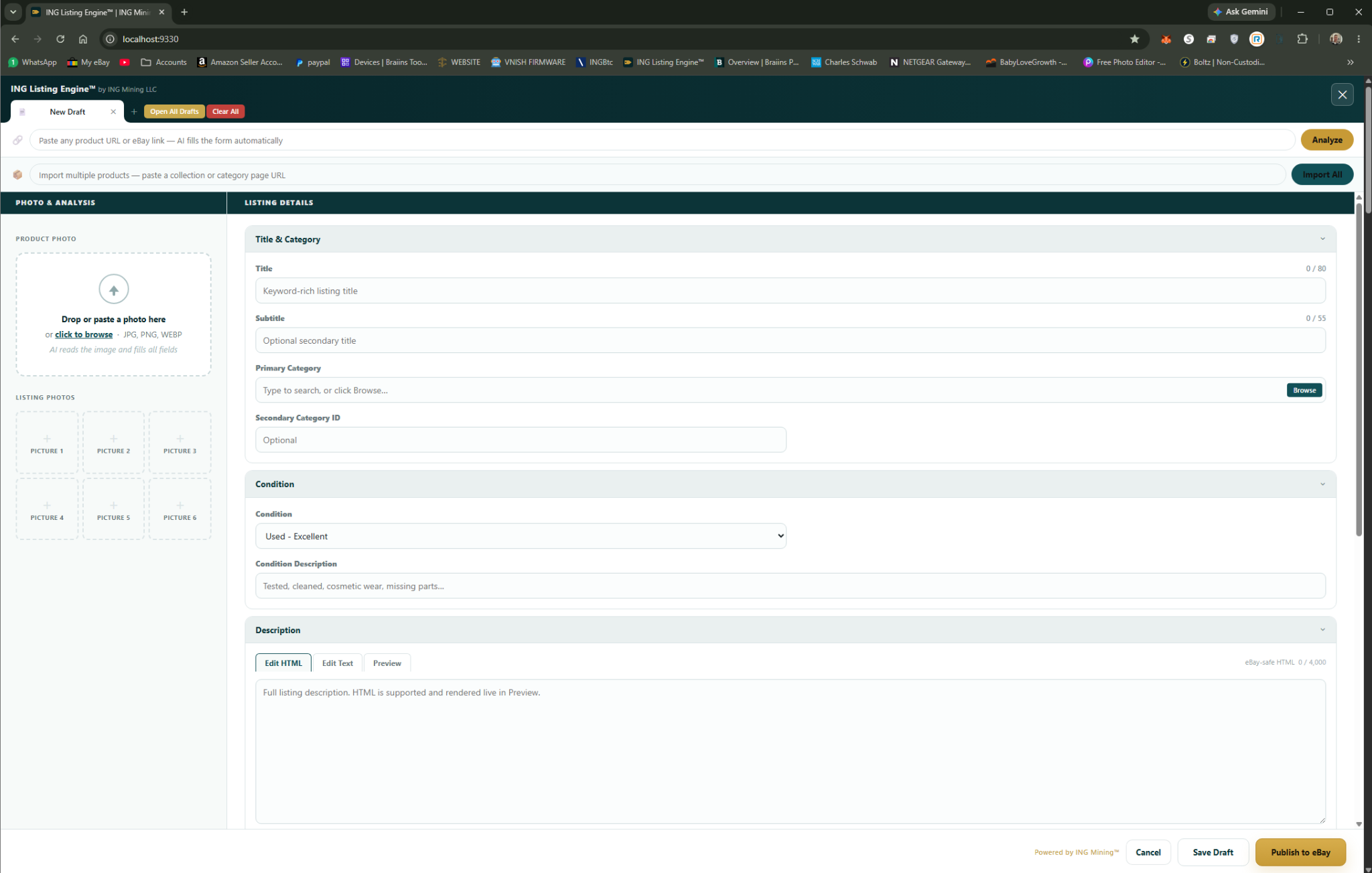
Paste Any Product URL

The starting point is as simple as it gets. Copy any product URL — supplier page, manufacturer site, existing marketplace listing — and paste it into the import field. The AI handles everything from there.
Works with any website — no scraper configuration needed
Reads product title, specs, photos, and description automatically
Processes in ~10 seconds from URL to filled listing
Supports ASIC miners, electronics, general merchandise, and more
ING Listing Engine URL import screen — paste product URL to auto-fill eBay listing

Complete Listing, Auto-Filled

After the AI reads your product URL, your entire eBay listing form populates automatically. Title is keyword-optimized for eBay search ranking. Description is professional HTML with a formatted spec table.
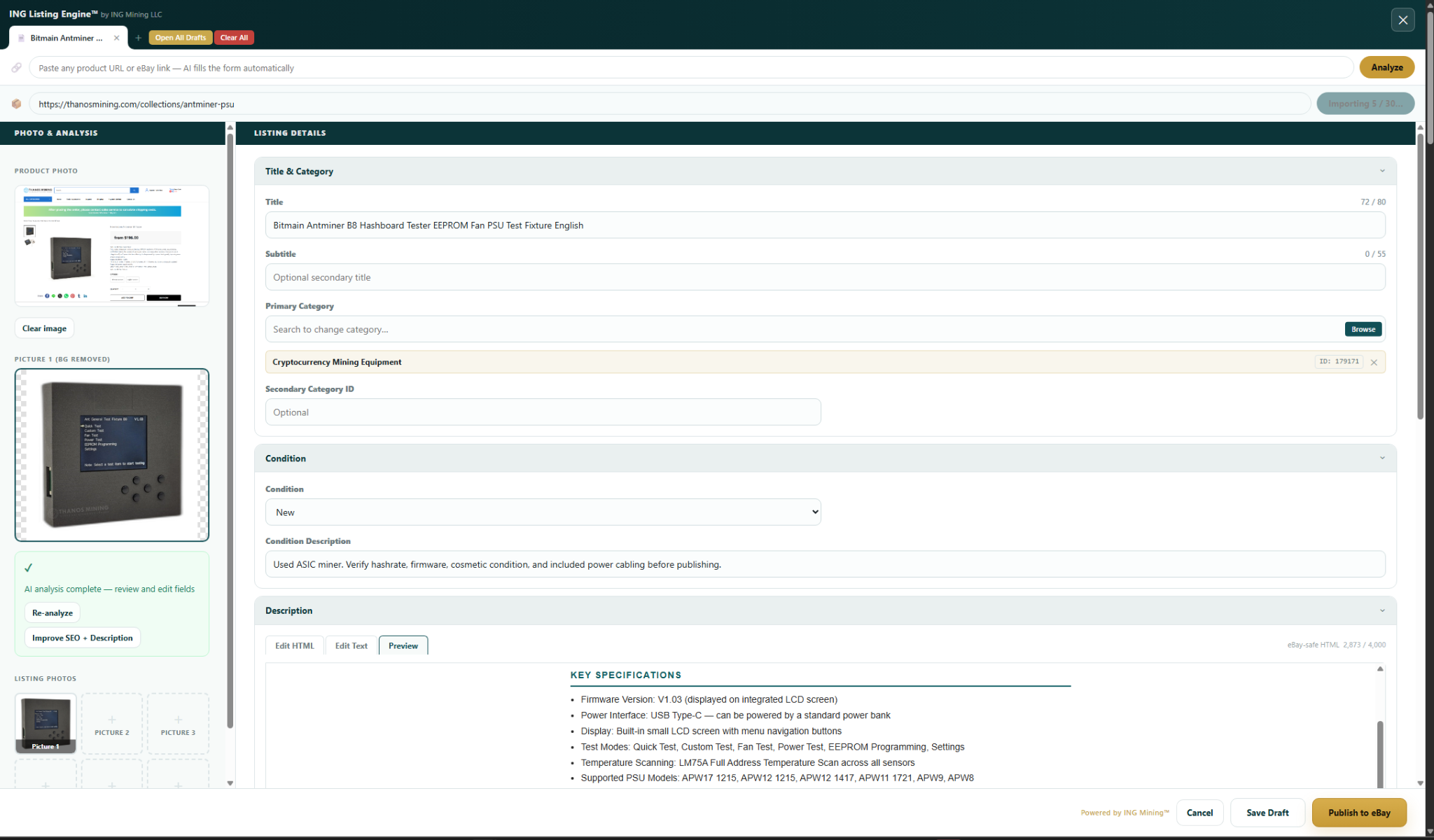
Keyword-optimized title under 80 characters
Professional HTML description with spec table
eBay category selected automatically
Pricing estimated from current eBay sold comparables
Product photos pulled directly from source page
AI autofilled eBay listing — title, description and category populated automatically

20+ Item Specifics, Done

Item specifics are the most tedious part of eBay listing — brand, model, compatibility, algorithm, hashrate, power, connectivity. The AI fills every field it can find data for, adapting to the product category.
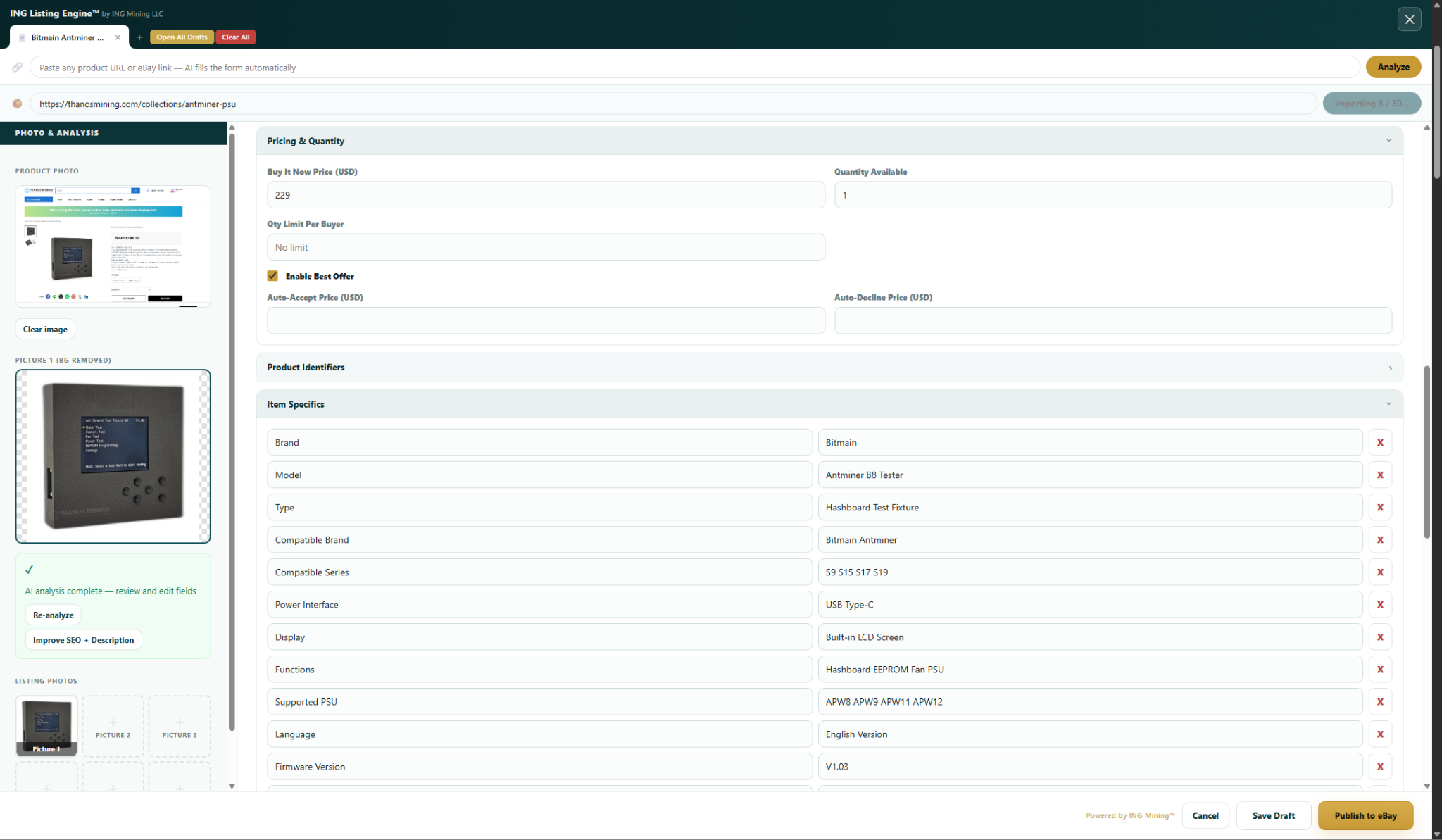
Brand, Model, MPN auto-detected
Mining-specific fields: Algorithm, Hashrate, Power Draw
Condition, compatible currencies, connectivity
eBay-required fields flagged so nothing gets missed
eBay item specifics autofill — brand, model, hashrate, algorithm fields populated by AI

Bulk Import Entire Collections

For sellers with large inventory — paste a supplier’s collection or category page URL, and every product on that page gets processed simultaneously. Each product opens as its own tab, fully pre-filled and ready to publish.
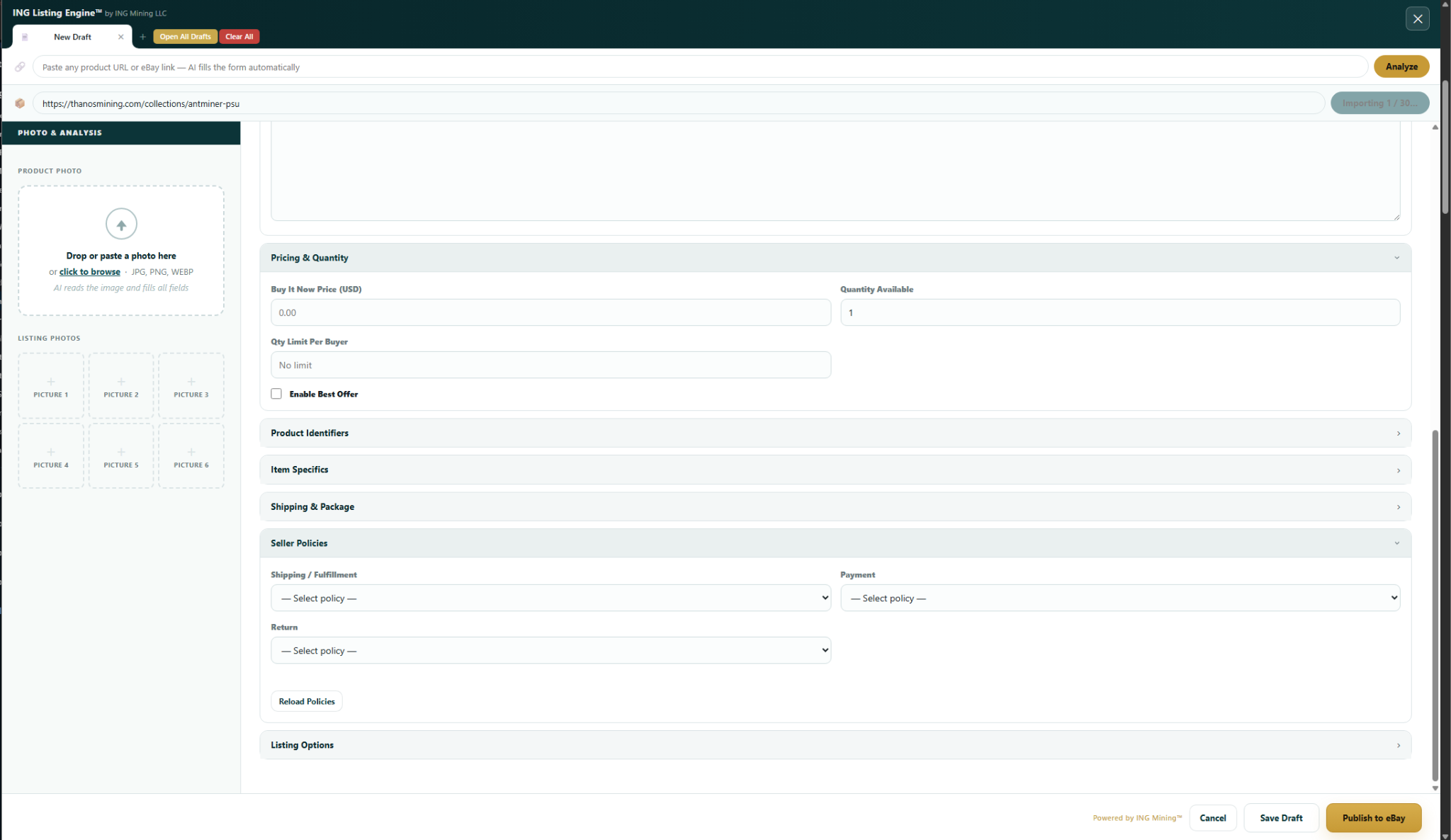
Paste one collection URL, process all products at once
Each product gets its own pre-filled draft tab
Progress bar shows import status in real time
Review and publish at your own pace
Bulk collection import progress — multiple eBay listings being processed simultaneously

One Click to Go Live on eBay

When you’re happy with the listing, hit Publish. The app connects directly to your eBay seller account via OAuth and creates the active listing instantly. No browser switching, no copy-pasting.
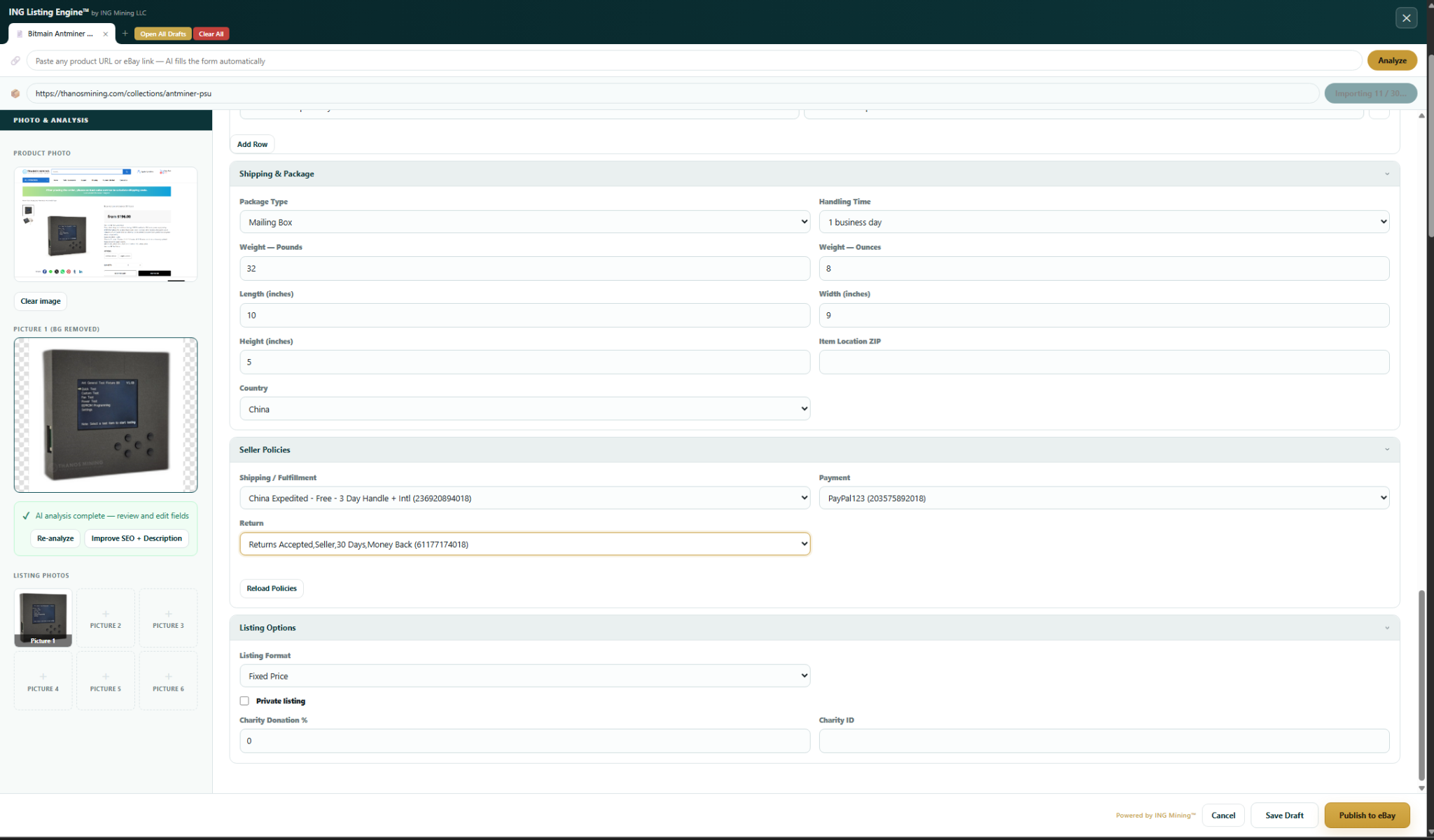
Publishes live to eBay via the official Sell API
Your eBay account connected securely via OAuth
Listing appears active on eBay immediately
Confirmation and listing ID shown in the app
Publish-ready eBay listing with one-click publish button — direct eBay Sell API integration

Track Your Published Inventory

All listings published through the app are tracked in the built-in inventory dashboard. See what’s live, what’s in draft, and manage your listings without leaving the app.
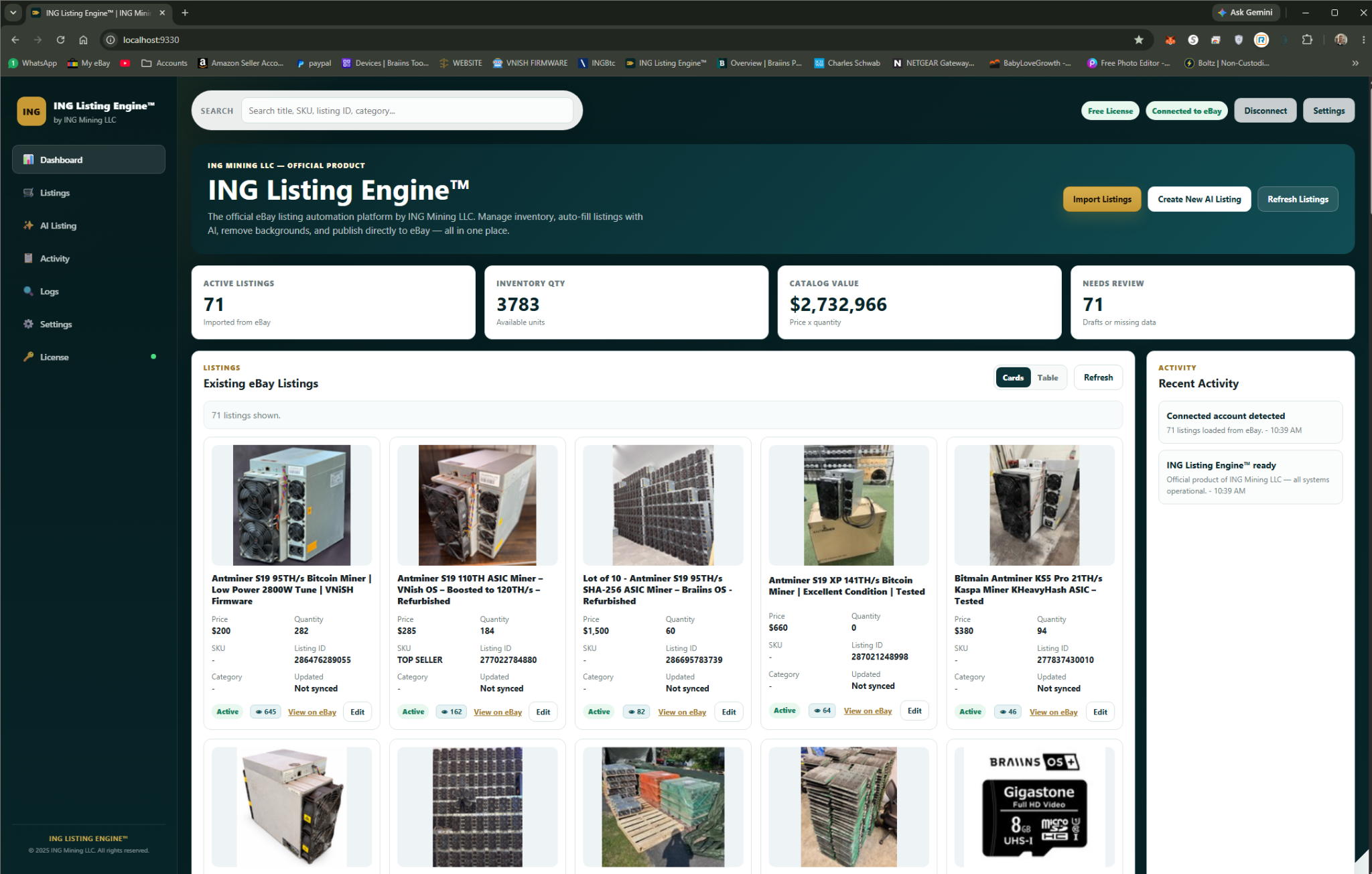
View all published and draft listings in one place
Status tracking — active, draft, sold
Quick access to re-edit any listing
Activity log shows all recent actions
ING Listing Engine inventory dashboard — track published and draft eBay listings

Everything you need to list faster.

Every feature is included, unlocked, and free — no tiers, no upsells.

🔗

URL-to-Listing Import

Paste any product URL and Claude AI reads the page, extracting all listing data automatically — works on any website without configuration.

Bulk Collection Import

Paste a supplier’s category page and every product gets processed simultaneously into separate draft tabs — ready to review and publish.

📝

AI-Written Descriptions

Professional HTML descriptions with formatted spec tables, written to maximize eBay buyer engagement and search visibility.

🏷️

Keyword-Optimized Titles

Titles are generated under 80 characters with eBay search keywords included — using real eBay ranking signals.

📋

Automatic Item Specifics

20+ item specifics fields filled per listing including brand, model, MPN, and category-specific fields like hashrate for mining hardware.

📸

Photo Editor Built In

Crop, rotate, adjust, add text, draw shapes, apply filters, and remove backgrounds — all without leaving the app.

💰

Pricing from Sold Comps

Suggested pricing is estimated from current eBay sold comparable data — not just random guesses.

🚀

Direct eBay Publishing

One click publishes your listing live to eBay via the official Sell API — no copy-pasting into Seller Hub.

vs. the alternatives.

See how ING Listing Engine stacks up against manual listing and paid tools.

Feature ING Listing Engine Manual (eBay Seller Hub) Paid Listing Tools
Price Free forever Free $20–$100/mo
Time per listing ~10 seconds 20–30 minutes 5–15 minutes
AI-written descriptions ✓ Included ✗ Manual ✗ Templates only
Item specifics auto-fill ✓ 20+ fields ✗ All manual Partial
URL-to-listing import ✓ Any URL ✗ None Supplier-specific only
Bulk import ✓ Collection pages ✗ None ✓ CSV only
Built-in photo editor ✓ Full editor ✗ None ✗ None
No install required ✓ Single .exe ✓ Browser Usually requires install

Common questions.

Everything you need to know before downloading.

Is it really free? What’s the catch?
No catch. ING Listing Engine is freeware — no subscription, no expiry, no feature gating. It was built to solve a real problem and released free. You do need your own Claude AI API key (Anthropic offers free tier credits) and your own eBay seller account.
What do I need to get started?
Windows 10 or 11, a free Anthropic Claude API key (for AI features), and an eBay seller account. The app walks you through connecting both during first-time setup. No install — just double-click the .exe file.
Does it work for products outside of mining hardware?
Yes. The AI adapts to any product category — electronics, tools, clothing, collectibles, auto parts, sporting goods. The item specifics it fills will match whatever eBay category the product belongs to.
Is my eBay account information secure?
Your credentials are stored locally in a credentials.json file on your own PC — they never leave your machine and are not sent to any third-party server. eBay authentication uses the official OAuth flow.
Can I edit the AI-generated listing before publishing?
Absolutely. Everything the AI fills is fully editable before you publish. The AI gives you a strong starting point — you review, tweak, and approve before anything goes live on eBay.
How does the bulk import work?
Paste a collection or category page URL (e.g., a supplier’s product grid page). The app detects all product links on the page and processes each one in parallel. Each product opens as its own draft tab with AI-filled fields, ready to review and publish one by one.
What eBay marketplaces are supported?
The app uses the eBay Sell API and currently targets eBay US (ebay.com). eBay sandbox mode is also supported for testing without creating live listings.
Where can I get help or report bugs?
Open an issue on the GitHub repository at github.com/essquireo0o/ING-eBay-Autolister — or email ING Mining directly. Active development continues and bug reports are taken seriously.

Start listing in 60 seconds.

Download the free .exe, connect your eBay account, and paste your first product URL. Your listing will be filled and ready to publish before you finish your coffee.

⬇ Download ING Listing Engine — Free
Windows 10 & 11 No install required No subscription No expiry